Hospital Executive Command Dashboard
This section provides an exhaustive, production-grade guide to the Hospital Executive Command Dashboard in MOANA EHR. Serving as the primary command center for Hospital Administrators, Medical Directors, and Nursing Supervisors, the dashboard aggregates real-time patient census metrics, clinical deterioration alerts, the active patient worklist, inter-facility referral queues, ward occupancy snapshots, and AI-assisted bed demand forecasts.
- Authorized Roles: Hospital Administrator, Medical Director, Chief of Nursing / Ward Sister, Triage Officer, Admission & Discharge Coordinator.
- Module Identifier: Module 01 (Executive Dashboard & Hospital Command Center).
1. Module Overview & Command Architecture
The Executive Dashboard consolidates clinical, diagnostic, and administrative workflows into a unified, high-density command console:
graph TD
    A[Hospital Executive Command Dashboard] --> B[1. Real-Time Census & KPI Cards]
    A --> C[2. Smart Action Queue & Patient Worklist]
    A --> D[3. Rapid Patient Intake & QR Health ID Scanner]
    A --> E[4. MEWS Clinical Deterioration Alerts]
    A --> F[5. Inter-Facility Referral Inbox]
    A --> G[6. Cross-Departmental Clinical Tasks]
    A --> H[7. Ward Snapshot & AI Capacity Forecast]
    A --> I[8. Live Chronological Activity Stream]
    A --> J[9. Inpatient & ED Discharge Processor]
2. Header Bar & Rapid Action Controls
The top header bar provides facility context and rapid clinical intake shortcuts:
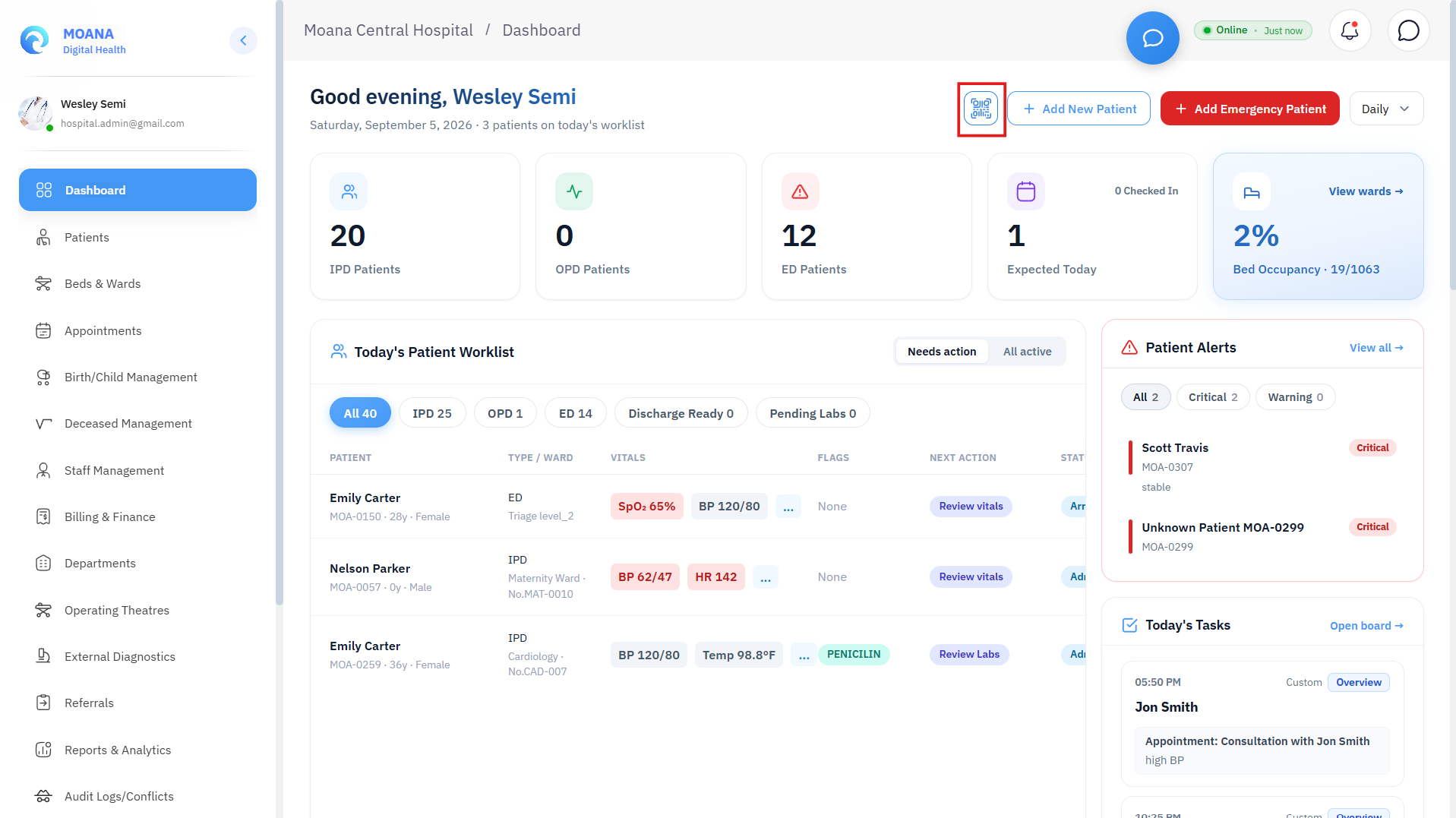
Core Header Controls:
- Facility Context Indicator: Displays the active hospital or health center name and National Facility Identifier (NFI).
- Dynamic Period Filter: Toggle between
Daily,Weekly,Monthly, andYearlyto calculate census volumes, admission deltas, and outpatient trends dynamically across all cards. + New Patient: Launches the comprehensive OPD/IPD Patient Registration Modal with Master Patient Index (MPI) deduplication.+ Emergency: Launches the STAT Emergency Trauma Intake Modal for immediate red/yellow triage cases without demographic delays.Scan Health ID Card(QR Code Engine):- Built-in client-side QR decoder.
- Supports uploading scanned National Health ID cards or digital PDF vouchers.
- Resolves the patient's encrypted Health ID token and automatically links them to the active facility.
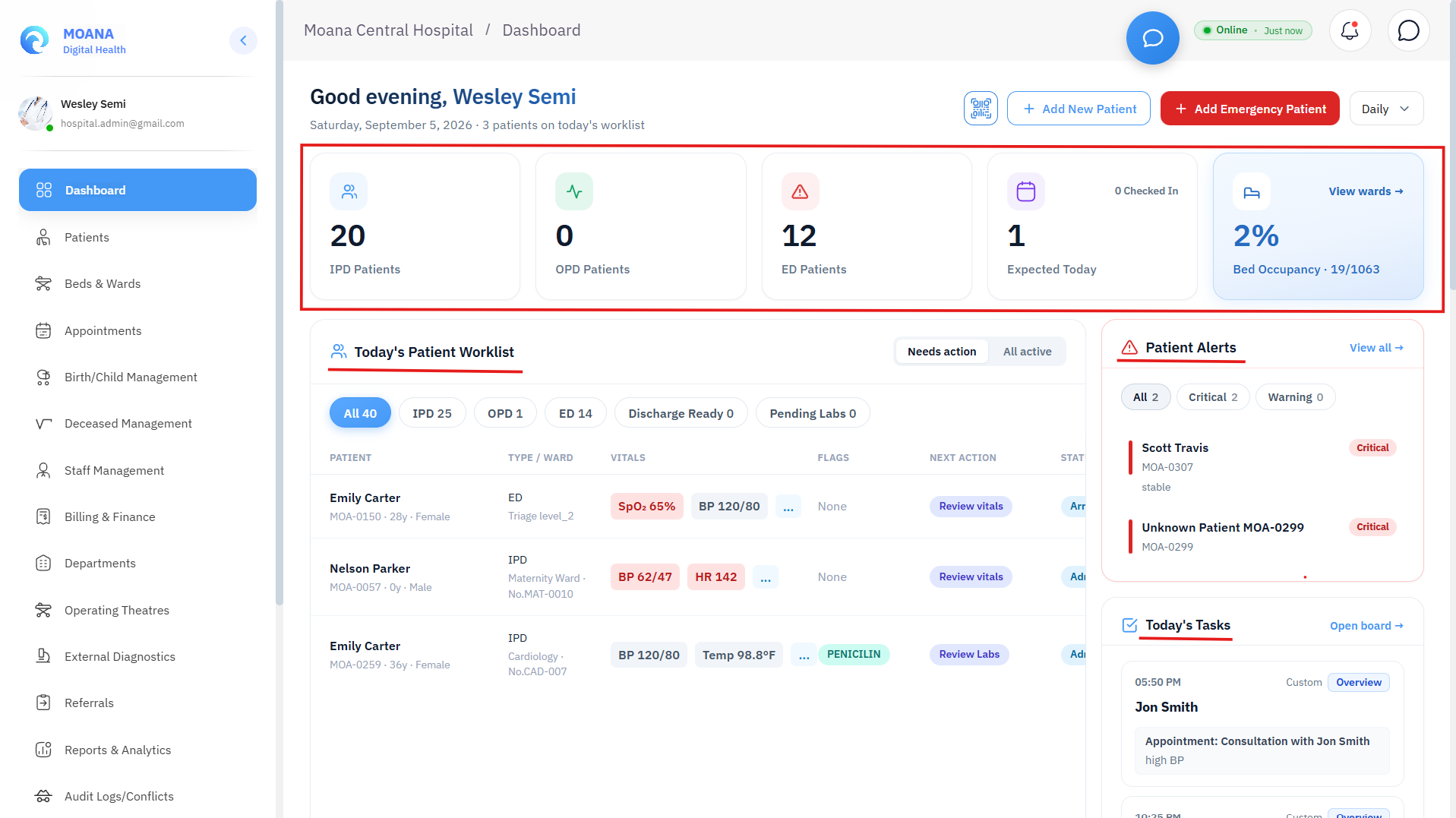
3. Top Census & Key Performance Indicators (5 Core Stat Cards)
The top census bar calculates real-time patient volumes and facility capacity:
| Metric Card | Data Source & Calculation | Operational Significance |
|---|---|---|
| IPD Patients | Active inpatient admissions with % trend delta vs. previous period. | Live hospitalized patient census across all clinical wards. |
| OPD Patients | Total outpatient triage and consultation encounters registered today. | Ambulatory volume and outpatient clinic throughput. |
| ED Patients | Active Emergency Department and acute trauma cases currently under observation. | Emergency room congestion and immediate resuscitation load. |
| Expected Today | Checked-In / Total Scheduled appointment ratio. | Tracks clinic attendance and no-show rates. |
| Bed Occupancy | Overall hospital percentage, calculated as (Occupied Beds / Total Capacity) * 100. | Macro capacity strain; triggers escalation protocols when ≥ 80%. |
Bed Capacity & ICU Buffer Panel:
- Total Hospital Beds: Total operational bed inventory.
- Beds Occupied: Currently admitted patient count.
- ICU Beds Allocated: Active patients in Intensive Care Units.
- ICU Beds Remaining (Headroom): Critical life-support buffer available for emergency surgical or respiratory intake.
4. Patient Worklist & Action Queue
The Patient Worklist is the hospital's operational workhorse, structured into two distinct viewing modes:
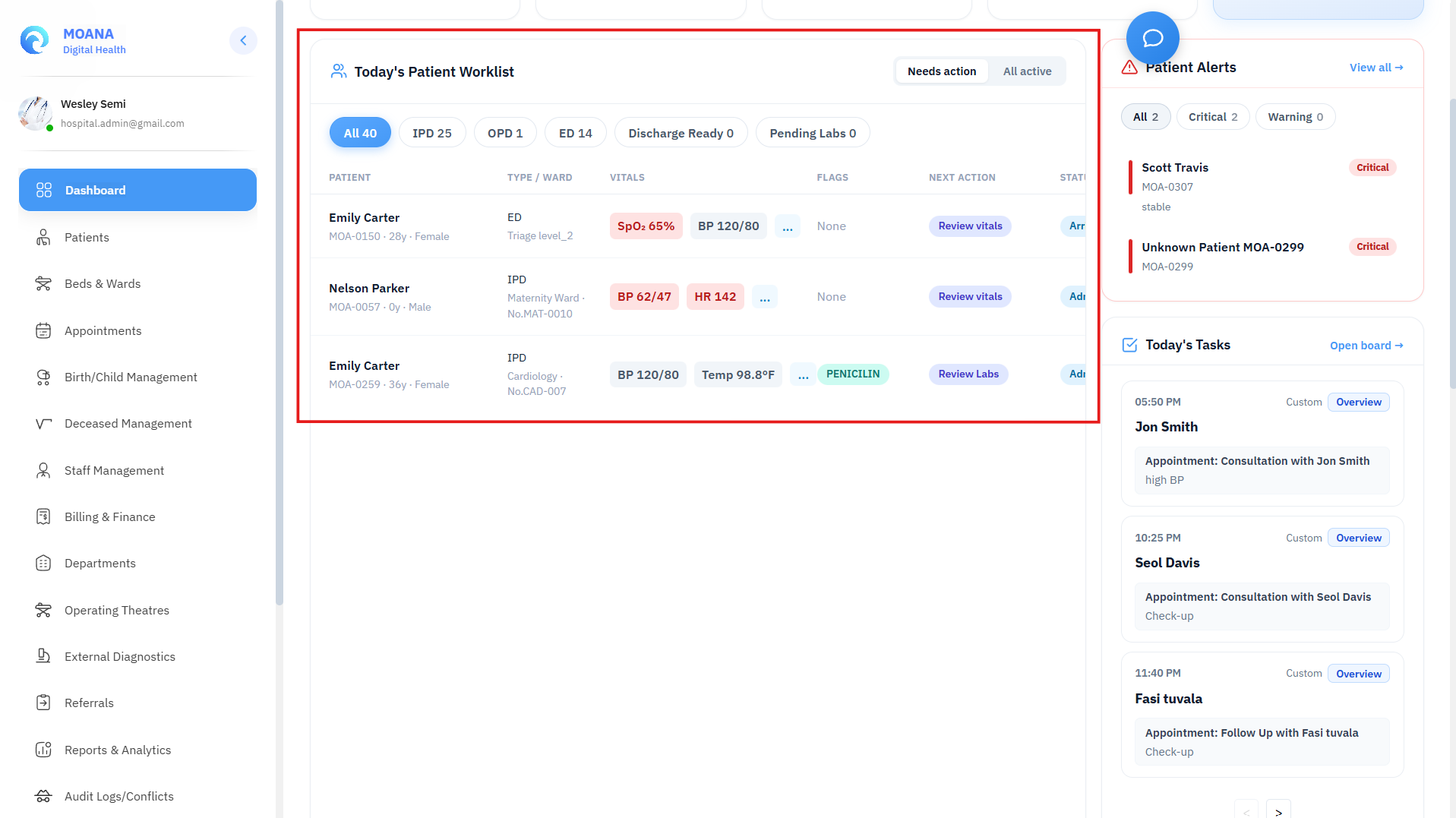
Viewing Scopes:
- Action Queue (
Today's Action Required- Default):- Smart triage filter that isolates patients requiring immediate clinical or administrative action:
- Discharges ready for clinical summary sign-off.
- Inpatients with pending critical laboratory or radiological orders.
- High-acuity patients with deteriorating MEWS scores.
- Smart triage filter that isolates patients requiring immediate clinical or administrative action:
- All Active Census:
- Full facility roster displaying every patient currently registered in OPD, IPD, or ED.
Encounter Type Filters:
- Filter chips allow 1-click isolation of
All,OPD (Outpatient),IPD (Inpatient), orED (Emergency)cohorts.
Patient Row Data Architecture:
- Patient Identity: Photo Avatar, Full Name, Gender, Calculated Age, and unique Moana ID / MRN (
MOA-XXXXX). - Encounter Badge: Color-coded
OPD(Purple),IPD(Orange), orED(Red) tag. - Bed & Ward Location: Assigned ward and bed identifier (e.g., Bed 04 · Female Surgical).
- Care Team: Assigned Attending Physician and Primary Floor Nurse.
- Interactive Vitals Popover: Real-time physiological readout (Blood Pressure, Heart Rate, Temperature, SpO2, Respiratory Rate, Blood Glucose).
- Clinical Risk & Precautions Badges: Real-time flags for Allergies, Fall Risk, Contact/Airborne Isolation Precautions, and Chronic Comorbidities.
Contextual Action Palette:
View Dossier: Opens the slide-over patient drawer with full clinical summaries, active medications, and recent diagnostic procedures.Discharge Patient: Opens the formal Inpatient / ED Discharge Modal.Assign Doctor / Nurse: Fast care-team allocation modal.
5. Clinical Deterioration & Early Warning Alerts Panel
The Clinical Alerts panel continuously monitors real-time bedside vital entries using the NEWS2 / Modified Early Warning Score (MEWS) protocol:
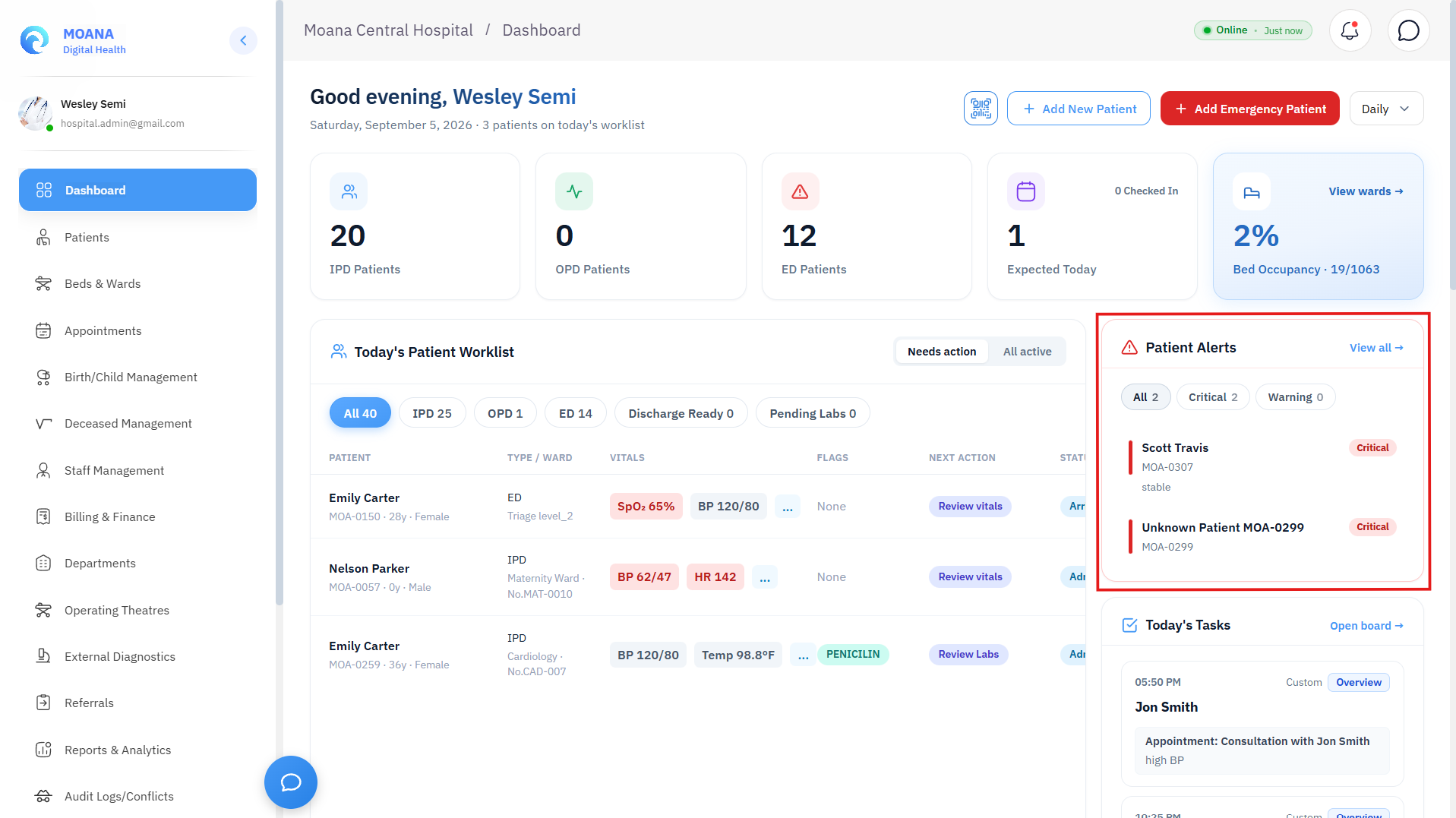
Alert Tiers:
- 🟡 Warning Alert (MEWS 3–4):
- Indicates moderate physiological drift (e.g., mild tachycardia, low-grade pyrexia, borderline tachypnea).
- Requires nurse bedside re-assessment within 30 minutes and increased vitals monitoring frequency (
q2h).
- 🔴 Critical Alert (MEWS ≥ 5):
- Severe physiological instability (e.g., SBP < 90 mmHg, SpO2 < 92%, HR > 130 bpm, GCS < 13).
- Automatically notifies the charge nurse and triggers immediate Medical Emergency Team (MET) / Doctor review.
Supervisors can click View All Alerts to open the dedicated search modal with filtering by department, acuity level, and timestamp.
6. Inter-Facility Referral Inbox
The Referral Inbox governs clinical care coordination between the hospital and referring district clinics or specialized tertiary centers:
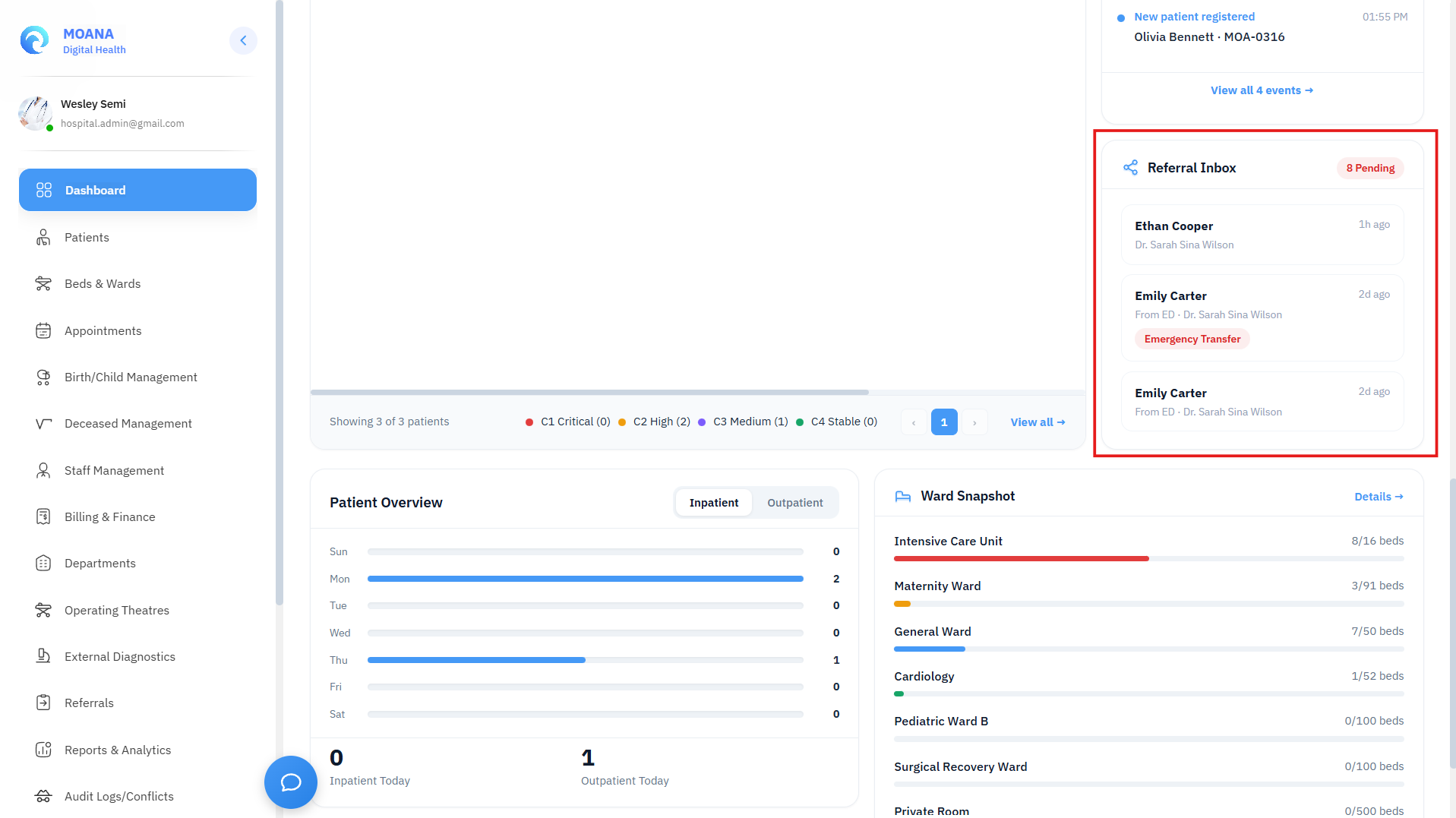
Referral Management Workflow:
- Incoming Referral Triage:
- Displays referring clinician name, originating district/clinic, clinical justification, and priority tag (e.g., High Priority, Routine Specialist Consult).
- Clinical Decision Actions:
Accept Referral:- Confirms intake, registers the patient into the facility Master Patient Index, and generates a pre-booked specialist appointment or direct ward bed reservation.
Delegate Referral:- Routes the case to an internal sub-specialty department (e.g., Orthopedics, Neurosurgery, High-Risk Obstetrics) with clinician handover notes.
Decline / Return:- Formally rejects referral with clinical justification transmitted back to the sending facility.
7. Cross-Departmental Clinical Task Center
The Clinical Tasks panel provides transparent workload tracking across medical, nursing, diagnostic, and support staff:
- Task Categorization: Medication administration due rounds, stat specimen draws, pre-op surgical checklists, radiology transport orders, and discharge counseling.
- Urgency Indicators: Color-coded priority badges (
STAT Urgent,High Priority,Normal,Routine). - Real-Time Statuses:
Pending,In Progress, andCompleted. - Supervisory Rebalancing: Charge nurses and administrators can reassign overdue tasks to available on-duty staff.
8. Ward Snapshot & AI Capacity Demand Forecasting
The bottom analytical section provides immediate operational visibility into ward utilization and predictive strain:
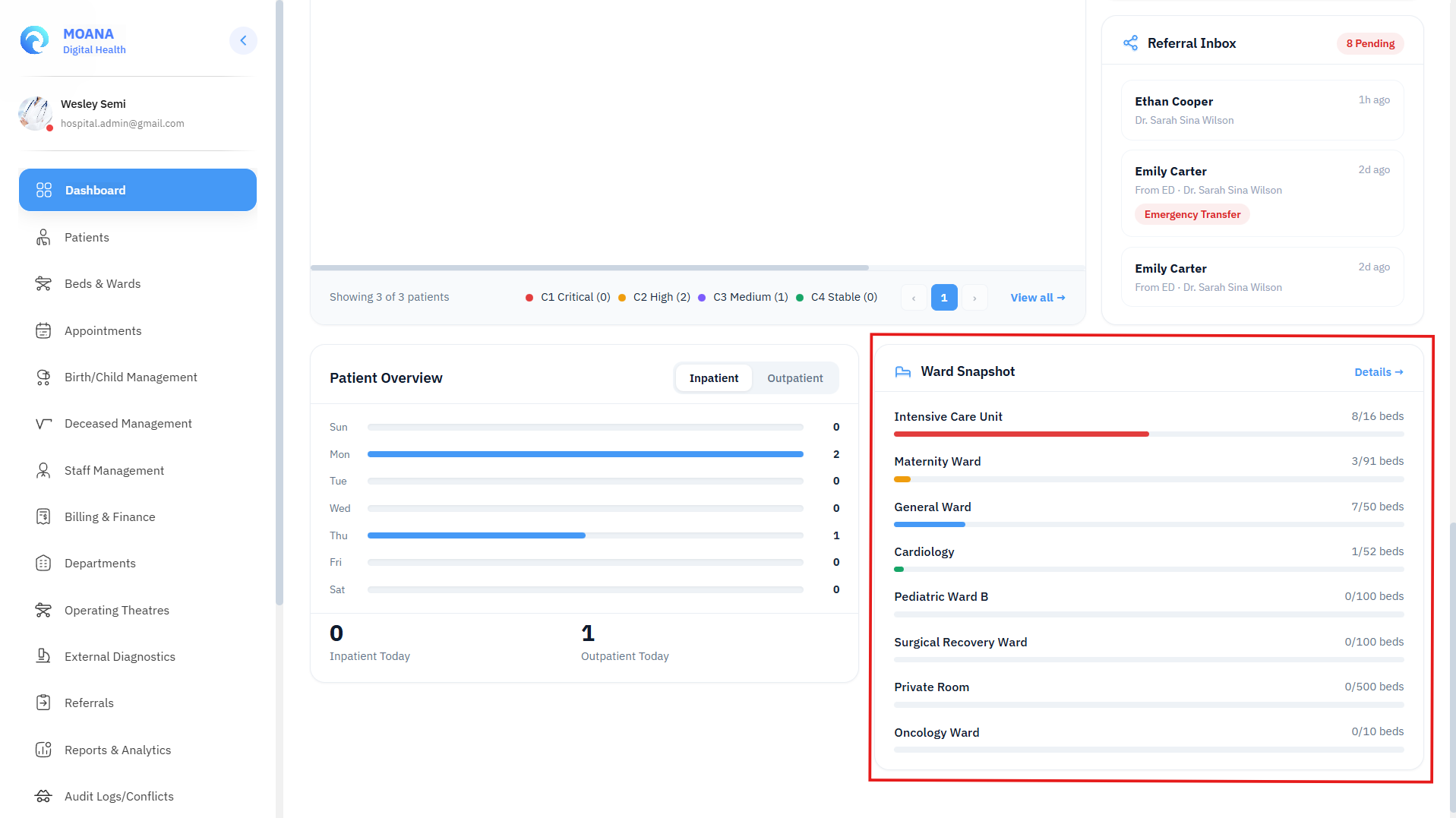
1. Ward Snapshot Progress Matrix:
- High-density visual bars displaying live occupancy per ward (e.g., Male Medical 18/20 Beds [90% - Red], Pediatric 12/25 Beds [48% - Green], ICU 9/10 Beds [90% - Red]).
- Click any ward row to jump directly into the Beds & Wards module with that ward pre-selected.
2. Embedded AI Capacity Demand Forecast:
- Powered by MOANA's epidemiological surveillance engine.
- Analyzes 7-day admission velocity, planned surgical bookings, and emergency triage trends to generate an automated narrative forecast:
- Predicts bed strain bottlenecks 24–48 hours in advance.
- Identifies peak discharge windows to optimize housekeeping turnover.
- Recommends early step-downs from ICU/HDU to general wards to maintain emergency resuscitation headroom.
9. Inpatient & ED Discharge Processor
Clicking Discharge Patient on any worklist row initiates the standardized discharge verification flow:
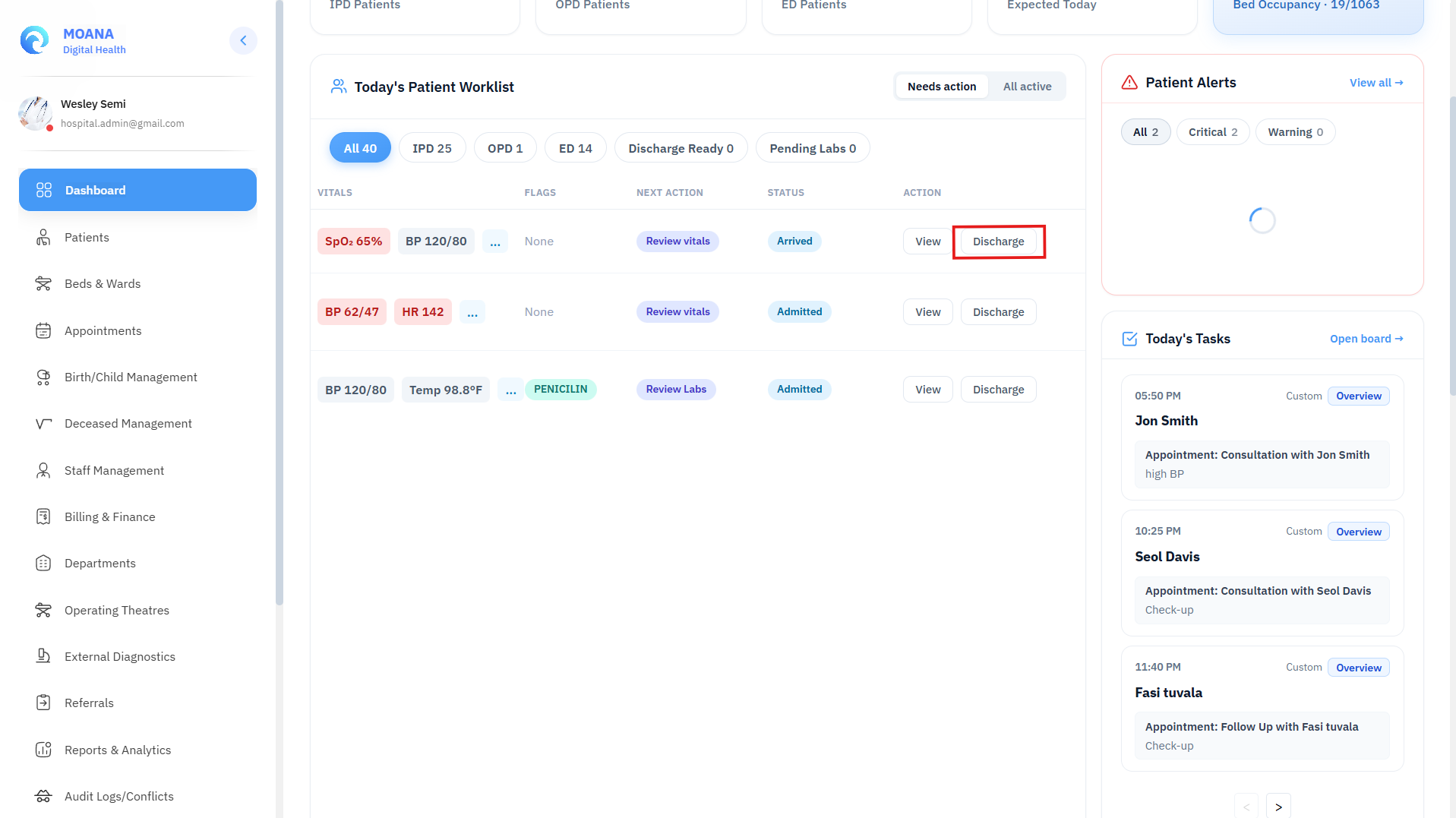
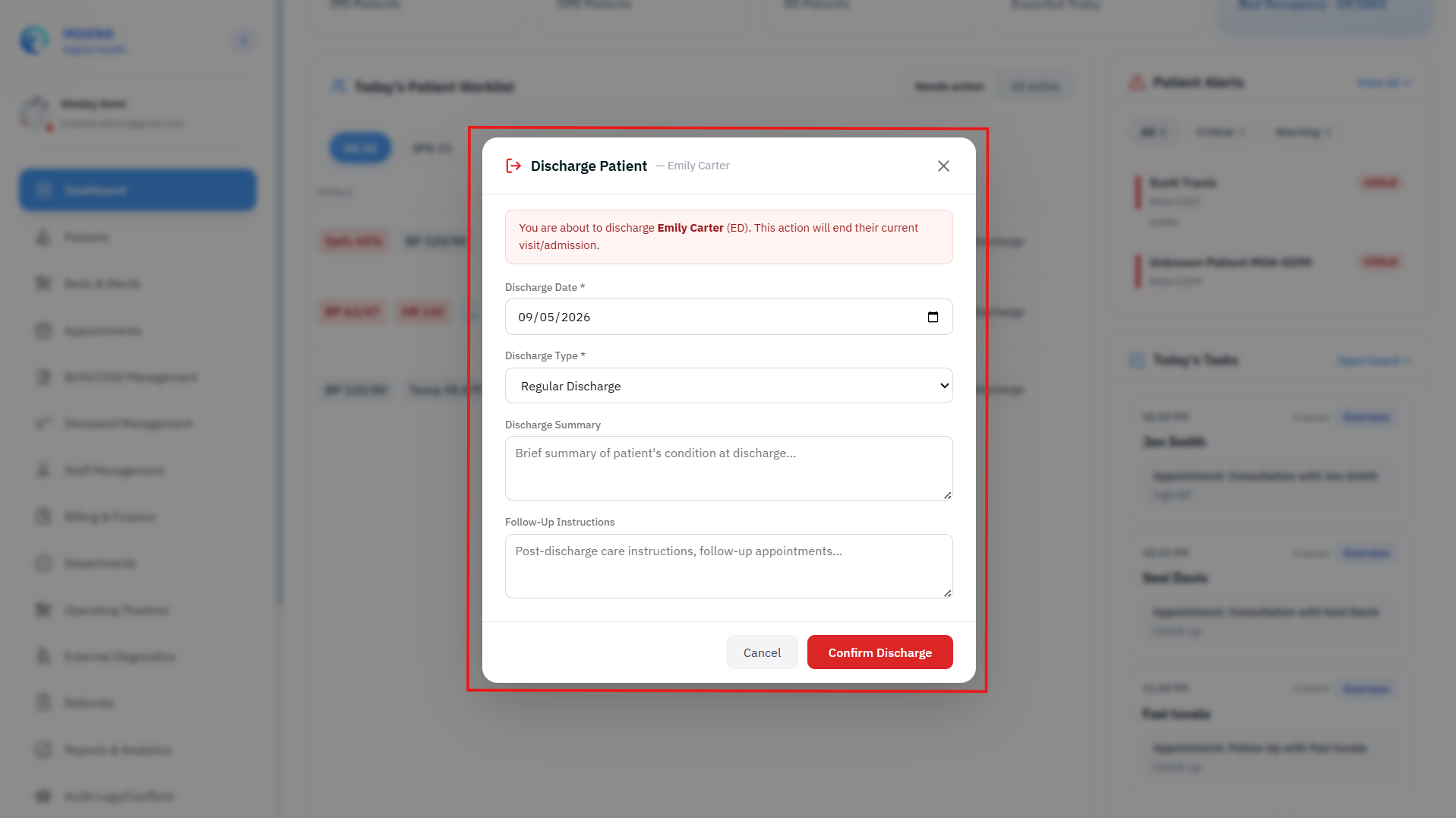
graph TD
    A[Click 'Discharge Patient'] --> B{Encounter Class Validation}
    B -->|Emergency ED| C[Execute ED Disposition: Discharge Home / Transfer / Left Against Advice]
    B -->|Inpatient IPD| D{Active Admission Check}
    D -->|No Active Admission| E[Blocked: Patient Never Formally Admitted]
    D -->|Active Admission Found| F{Attending Doctor Assigned?}
    F -->|No Doctor| G[Blocked: Assign Discharging Doctor]
    F -->|Doctor Verified| H[Enter ICD-10 Discharge Summary & Follow-Up Plan]
    H --> I[Commit Discharge -> Bed Transitions to 'Cleaning' -> Billing Triggered]
Discharge Rules:
- Encounter Discrimination:
- ED Patients: Processed via rapid emergency disposition (Discharged Home, Transferred to Tertiary Center, Left Against Medical Advice).
- IPD Inpatients: Requires formal inpatient admission verification, assigned discharging physician, ICD-10 clinical summary, and structured follow-up instructions.
- OPD Patients: OPD visits close automatically upon consultation sign-off and do not require formal discharge.
- Automated Facility Updates:
- Committing discharge immediately releases the bed, transitions its status to
Cleaning(orTerminal Clean Requiredfor isolation beds), closes the clinical encounter, and transmits the chart to Finance for final billing reconciliation.
- Committing discharge immediately releases the bed, transitions its status to