External Diagnostics Hub & Inter-Facility Referrals
This section details the External Diagnostics Hub and Referrals & Data Sharing systems in MOANA EHR. These tools govern partnerships with third-party diagnostic laboratories, radiology centers, cross-facility patient referrals, and interoperable clinical data exchanges.
1. External Diagnostics Hub Overview
When specialized pathology, histology, or advanced imaging (such as MRI/PET scans) must be referred to partner institutions or external reference laboratories, administrators manage these relationships through the External Diagnostics Hub.
graph TD
    A[Clinical CPOE Diagnostic Order] --> B{Internal vs. External Service?}
    B -->|Internal Lab/PACS| C[Moana-LIS / Local PACS Workflow]
    B -->|External Provider| D[External Diagnostics Hub Routing]
    D --> E[1. Provider Registry & Catalog Mapping]
    D --> F[2. Sample Dispatch & Order Tracking]
    D --> G[3. HL7 / FHIR Gateway Telemetry Integration]
    G --> H[Inbound Results Verification & Longitudinal Chart Integration]
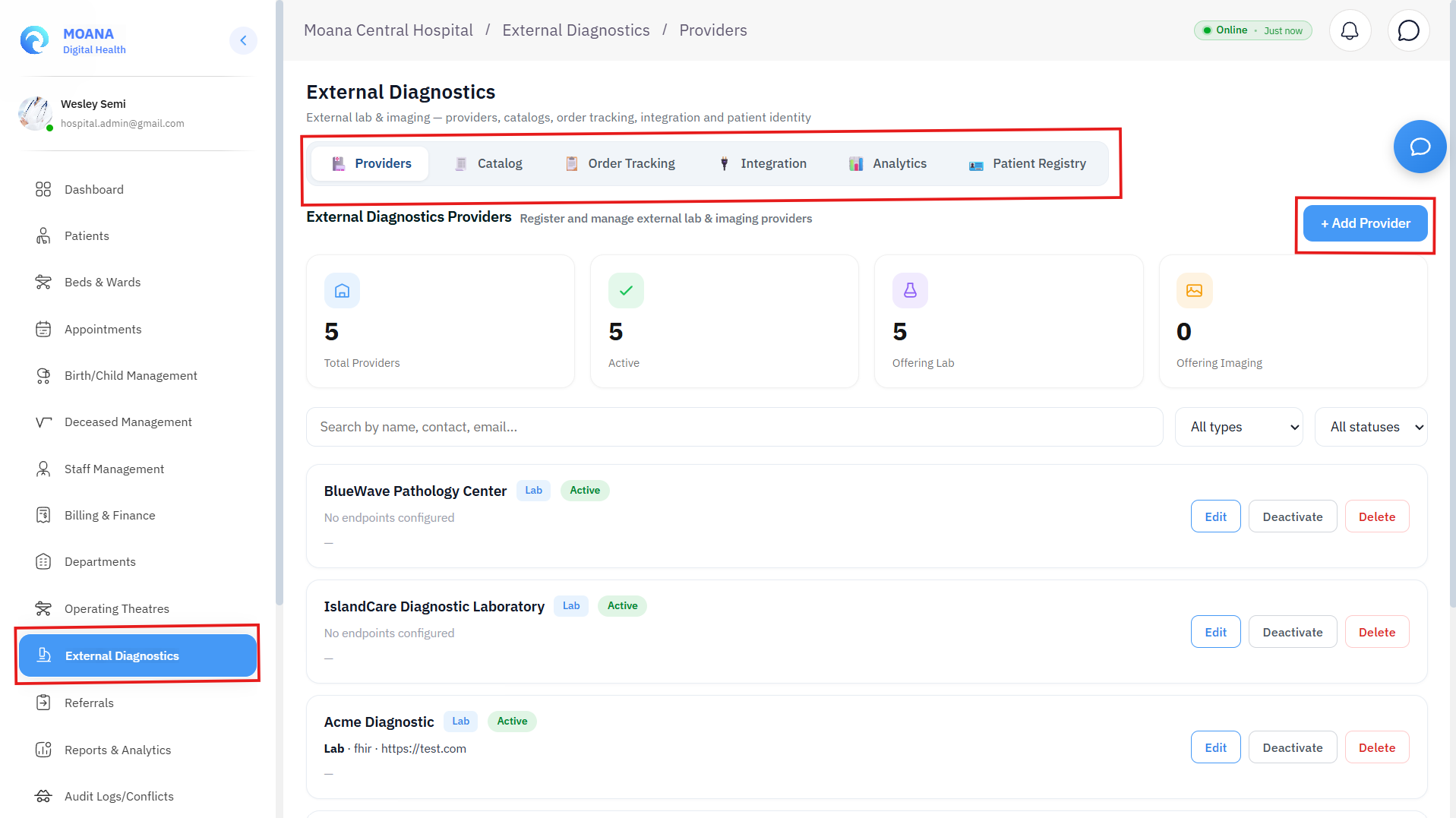
The 6 Core Hub Sections:
| Section | Purpose & Scope | Key Capabilities |
|---|---|---|
| 1. Providers | External partner directory | Manage reference laboratories, specialized imaging centers, pathology institutes, contact credentials, and SLAs. |
| 2. Catalog Mapping | Cross-facility code translation | Maps internal hospital order codes to external laboratory LIS test codes (LOINC / SNOMED CT). |
| 3. Order Tracking | Specimen dispatch & status | Real-time tracking of sent specimens, accession barcodes, transit status, and inbound pending results. |
| 4. Integration Monitor | Gateway health & latency | Live HL7 / FHIR endpoint telemetry, payload replay queues, and heartbeat metrics. |
| 5. EDP Analytics | Diagnostic turnaround KPIs | External Turnaround Time (TAT), cost per test, and provider SLA compliance benchmarking. |
| 6. Patient Registry (MPI) | Identity cross-referencing | National Master Patient Index deduplication and external demographic reconciliation. |
2. Provider Registry & Catalog Mapping
1. Registering an External Diagnostic Partner:
- Open External Diagnostics → Providers tab.
- Click
+ Add New Provider. - Specify provider legal name, specialty (Anatomic Pathology, Cytogenetics, Reference Biochemistry, High-Field MRI), facility identifier, contact dispatch email, and default transport courier.
- Set default turnaround time (TAT) SLA target (e.g., 48 Hours for Routine Biopsy, 4 Hours for STAT Frozen Section).
2. Diagnostic Catalog Code Mapping:
To ensure external laboratory results automatically map back to the correct patient chart fields:
- Enter internal test order code (e.g.,
LAB-HISTO-01: Endometrial Biopsy). - Map to the provider's external requisition code and standardized LOINC concept.
- Define automated normal/critical reference ranges and expected report payload format (PDF document, structured JSON, or HL7 ORU_R01).
3. Order Tracking & Specimen Chain of Custody
The Order Tracking console manages the physical and electronic chain of custody for external orders:
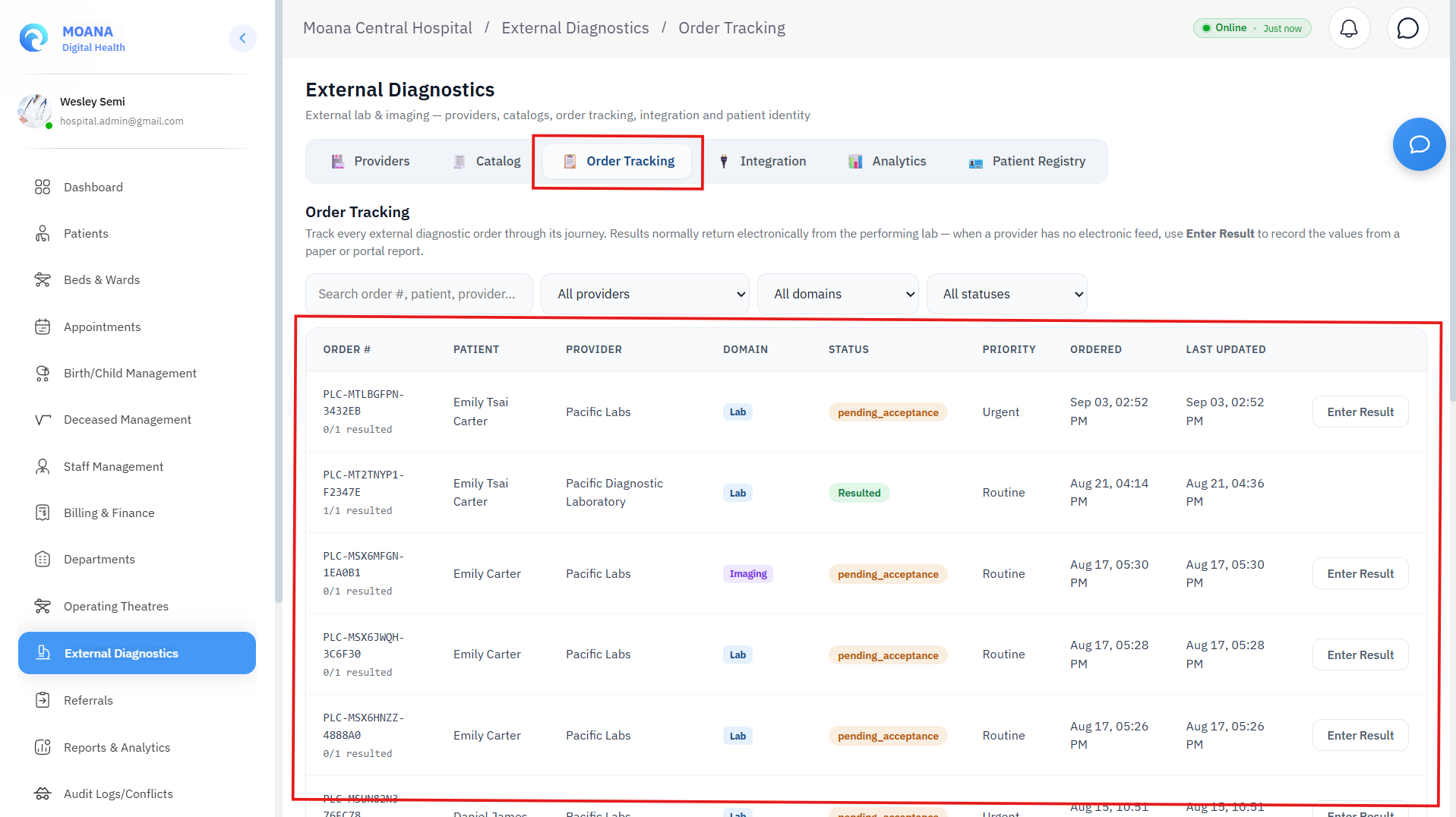
- Accession Barcode & Courier Manifest: Generates verifiable specimen shipping manifests with cold-chain transport requirements.
- Status Lifecycle:
Order Placed➔Specimen Collected➔Dispatched / In Transit➔Received at Partner Lab➔Analysis Ongoing➔Result Received & Verified. - Inbound Document Viewer: Clinicians can open inbound signed diagnostic PDFs and digital slides directly inside MOANA's integrated medical document viewer without downloading files to insecure local drives.
4. Cross-Facility Referrals & Clinical Data Sharing
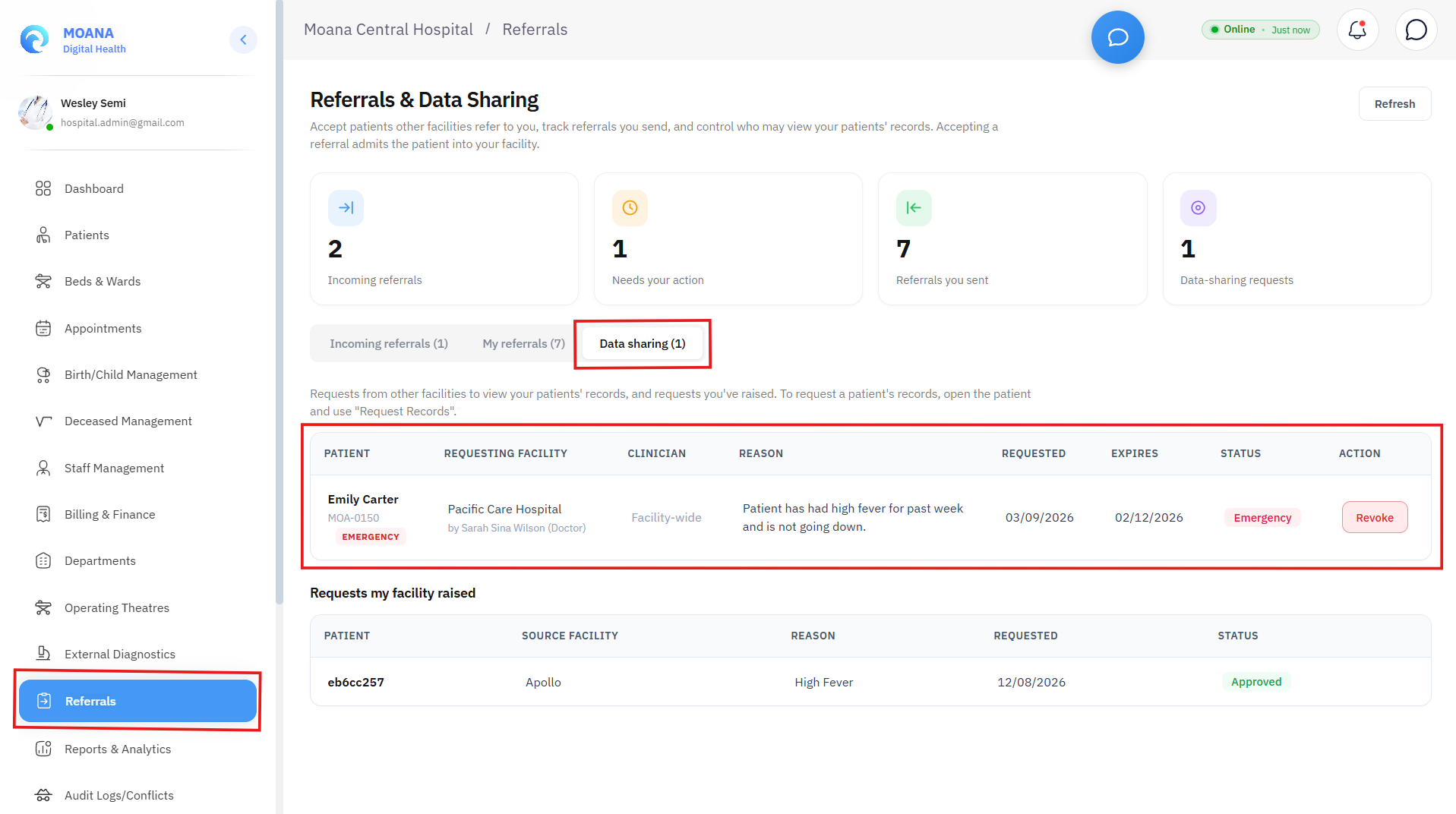
The Referrals & Data Sharing console manages inbound patient transfers, outbound specialist delegations, and inter-facility electronic health record sharing.
1. Incoming Patient Referrals (Hospital Intake):
- Review Triage: Review clinical referral packages sent from rural health centers or district clinics.
- Accept Referral: Automatically creates or updates the patient's record in the Master Patient Index and queues them for inpatient ward admission or specialist outpatient consultation.
- Decline Referral: Rejects referral with mandatory clinical rationale (e.g., Specialty unavailable, bed capacity exceeded; redirecting to provincial center).
2. Outgoing Referrals & Specialist Delegation:
- Clinicians generate standardized referral summaries attaching previous progress notes, medication histories, lab panels, and DICOM imaging studies.
- Track referral status in real-time (Pending Review, Accepted, Patient Seen, Discharged back to Primary Care).
3. Patient Consent & Cross-Facility Data Sharing:
- Consent Governance: View, approve, or revoke external facilities' access permissions to patient longitudinal charts.
- Emergency Cross-Facility Breakglass: Authorizes immediate emergency record access for trauma transfers with mandatory justification logging.