Operating Theatres (OT) Management & Surgical Wall Board
This section provides a complete operational guide to the Operating Theatres (OT) module in MOANA EHR, covering the Live Theatre Status Board, Fullscreen Corridor Wall Board, Surgical Case Scheduling & Pre-Op Checklists, Multi-Disciplinary Surgical Teams, Session Templates, and Theatre Utilization Analytics.
1. Module Overview & Surgical Governance
The Operating Theatres management console coordinates all elective and emergency surgical suites across the hospital. It ensures real-time visibility into theatre occupancy, streamlines surgical team allocations, enforces WHO Surgical Safety Checklists, and provides live turnover analytics to minimize perioperative delays.
graph TD
    A[Surgical Case Booking & Pre-Op Checklist] --> B[Surgical Team Assignment: Surgeon, Anesthetist, Scrub Nurse]
    B --> C[Live OT Status Board & Corridor Wall Board]
    C --> D[Intraoperative Phase: Patient in Room -> Knife-to-Skin -> Dressing]
    D --> E[Post-Op PACU Recovery & Room Turnover / Cleaning]
    E --> F[Turnover Analytics & Theatre Utilization Reports]
Core OT Capabilities & Features:
| Feature / Console | Purpose | Key Tools & Actions |
|---|---|---|
| Live Status Board | Real-time occupancy tracking | Color-coded status tiles (Available, Patient in Room, Surgery Ongoing, Turnover / Cleaning, Maintenance). |
| Corridor Wall Board | Departmental digital signage | Fullscreen high-contrast display for surgical corridors and nurse stations with auto-refresh telemetry. |
| Bookings & History | Procedure scheduling | Emergency and elective booking queue, ICD-10 procedure codes, estimated duration, and pre-op clearance checks. |
| Surgical Case Teams | Multi-disciplinary roster | Assign Lead Surgeon, Assistant Surgeon, Anesthetist, Scrub Nurse, Circulating Nurse, and Perfusionist. |
| Sessions & Preferences | Surgeon block allocations | Recurring session templates, surgeon specialty block allocations, and equipment preferences. |
| Turnover & Utilization | Efficiency benchmarking | First-case on-time starts, turnover interval (wheels-out to wheels-in), and room utilization percentages. |
2. Live Status Board & Surgical Suite Monitoring
The Live Status Board displays an interactive grid of all registered operating rooms in the facility:
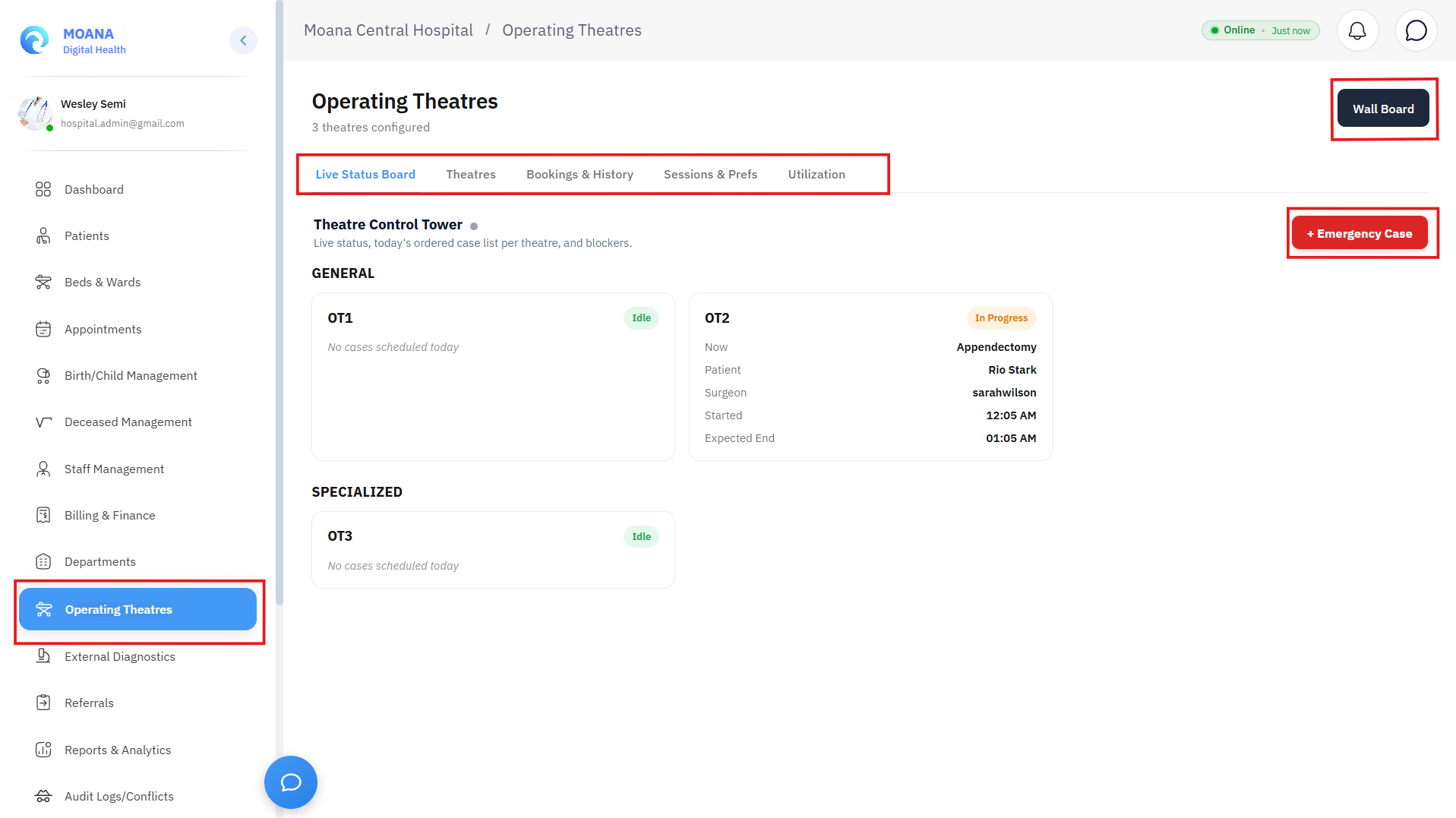
Real-Time Room Status Indicators:
| Status State | Color Indicator | Operational Meaning | Allowed Actions |
|---|---|---|---|
| Available / Ready | 🟢 Green | Room is clean, disinfected, and ready for patient intake. | Book emergency case, start pre-op intake. |
| Patient in Room | 🟡 Yellow | Patient transferred into OT; anesthesia induction in progress. | Log induction time, confirm monitoring. |
| Surgery Ongoing | 🔴 Red | Surgical procedure underway (Knife-to-skin logged). | Intra-op charting, blood loss tracking. |
| Turnover / Cleaning | 🟠 Orange | Patient transferred to PACU; terminal disinfection underway. | Request nursing wipe-down, prep next tray. |
| Maintenance / Closed | ⚫ Gray | Suite offline for laminar airflow service or maintenance. | View maintenance ticket, reopen suite. |
3. Corridor Wall Board (Digital Signage Mode)
For surgical hallways, scrub rooms, and nursing stations, administrators can activate the Fullscreen OT Wall Board:
- Automatic Telemetry Refresh: Live WebSocket updates refresh case countdowns, emergency trauma alerts, and room turnover timers every 15 seconds without user interaction.
- Privacy Safe Display: Displays patient initials, bed number, assigned Lead Surgeon, procedure category, and scheduled duration while masking confidential clinical notes from public corridors.
4. Scheduling Surgical Cases & Multi-Disciplinary Teams
Step-by-Step Surgical Case Booking:
Step 1Select Theatre Suite & Time Window
Open the Bookings & History tab. Click + New Theatre Booking. Select the target suite (e.g., OT 1 - Major General, OT 2 - Orthopedic, OT 3 - Emergency Obstetric), scheduled date, and estimated case duration.
Step 2Assign Surgical Case Team
Assign the required clinical personnel across all perioperative roles:
- Lead Surgeon & Assistant Surgeon: Primary operating physician and surgical assistant.
- Consultant Anesthetist & Anesthetic Nurse: Airway and hemodynamic monitoring leads.
- Scrub Nurse & Circulating Nurse: Sterile field setup, surgical instrument count, and circulating documentation.
Step 3Pre-Operative Clearance Verification
Confirm mandatory clinical safety prerequisites before saving the booking:
- Verified Blood Bank cross-match reservation (PRBC units available).
- Signed Informed Surgical & Anesthetic Consent forms.
- Pre-op fasting (NPO status verified).
- Anesthetic pre-assessment clearance note.
Step 4Commit Booking to Schedule
Click Schedule Case. The procedure is instantly visible on the master OT calendar, ward pre-op worklists, and surgeon daily rosters.
The surgical booking is committed, locking the room slot and notifying the pharmacy for sterile medication trays and the central sterile services department (CSSD) for instrument pack delivery.
5. Theatre Utilization & Efficiency Analytics
The Utilization tab delivers operational KPIs for hospital leadership:
- Room Utilization Rate (%): Proportion of staffed theatre hours occupied by active surgical cases.
- Turnover Interval (Minutes): Average time elapsed between one patient exiting the room (Wheels-out) and the next patient entering (Wheels-in).
- First-Case Start Accuracy: Percentage of elective surgical lists commencing within 10 minutes of scheduled start time.
- Cancellation Analysis: Categorization of postponed cases (Anesthetic unfitness, lack of ICU bed, emergency displacement, or patient no-show).