Laboratory Information System (LIS) & Blood Bank
The Laboratory Information System (Moana-LIS) manages diagnostic pathology, clinical biochemistry, hematology, microbiology, and transfusion medicine. Operating as an interconnected diagnostic hub, it unifies CPOE order intake, barcoded phlebotomy collection, analyzer communication, statistical quality control (QC), dual-stage pathologist verification, critical value dispatch, and blood bank inventory.
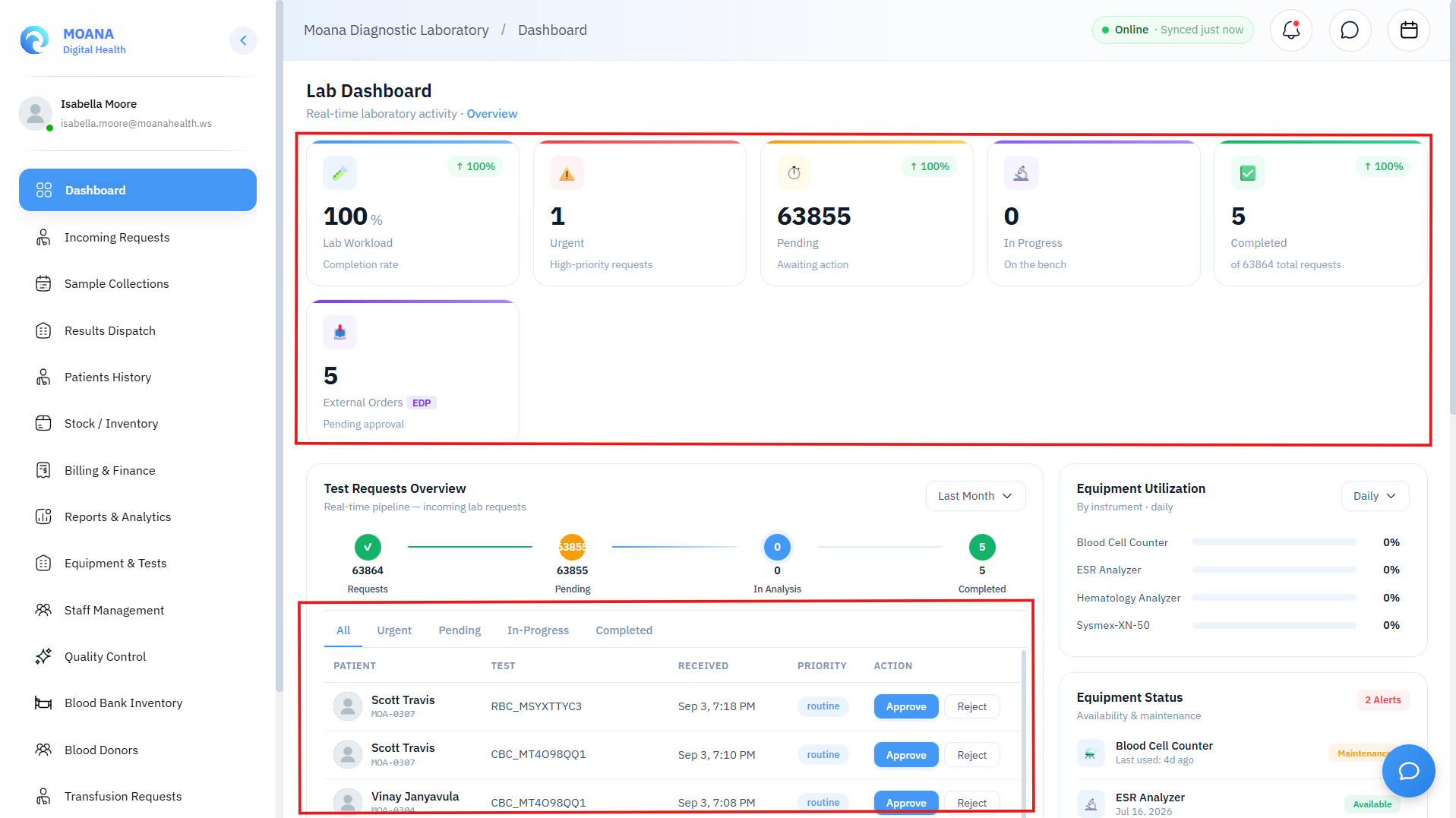
1. System Architecture & Two-Way Clinical Interoperability
The laboratory module operates in tight synchronization with the clinical hospital network:
graph LR
    A[Doctor CPOE Order] -->|HL7 FHIR ServiceRequest| B[LIS Accessioning Queue]
    B --> C[Phlebotomy & Barcode Labeling]
    C --> D[Analyzer Run & Bench Testing]
    D --> E[Statistical QC & Delta Checks]
    E --> F[Pathologist / Supervisor Verification]
    F -->|Critical Contact Log| G[Electronic Dispatch Release]
    G -->|HL7 DiagnosticReport| H[Doctor EHR Results Tab]
- Doctor Orders via CPOE: Clinicians place LOINC-standardized laboratory orders directly within the patient encounter.
- Accessioning in Moana-LIS: Incoming orders generate unique accession numbers and route to the corresponding bench section (Hematology, Biochemistry, Microbiology, Serology, Histopathology).
- Automated Result Return: Dispatched lab reports return electronically to the patient's continuous longitudinal EHR dossier in real time.
2. Complete Laboratory Workflow — Step by Step
Step 1: Incoming Order Triage & Accessioning
- Laboratory staff access the Incoming Requests console.
- Orders are sorted by clinical priority:
- 🔴 STAT: Immediate emergency processing (turnaround target < 30 minutes).
- 🟡 Urgent: Priority inpatient / intensive care processing.
- 🟢 Routine: Standard outpatient and scheduled inpatient testing.
- Accessioning assigns a permanent, unique Laboratory Accession ID linked directly to the patient's MOANA Health ID.
Step 2: Specimen Collection & Tube Barcoding
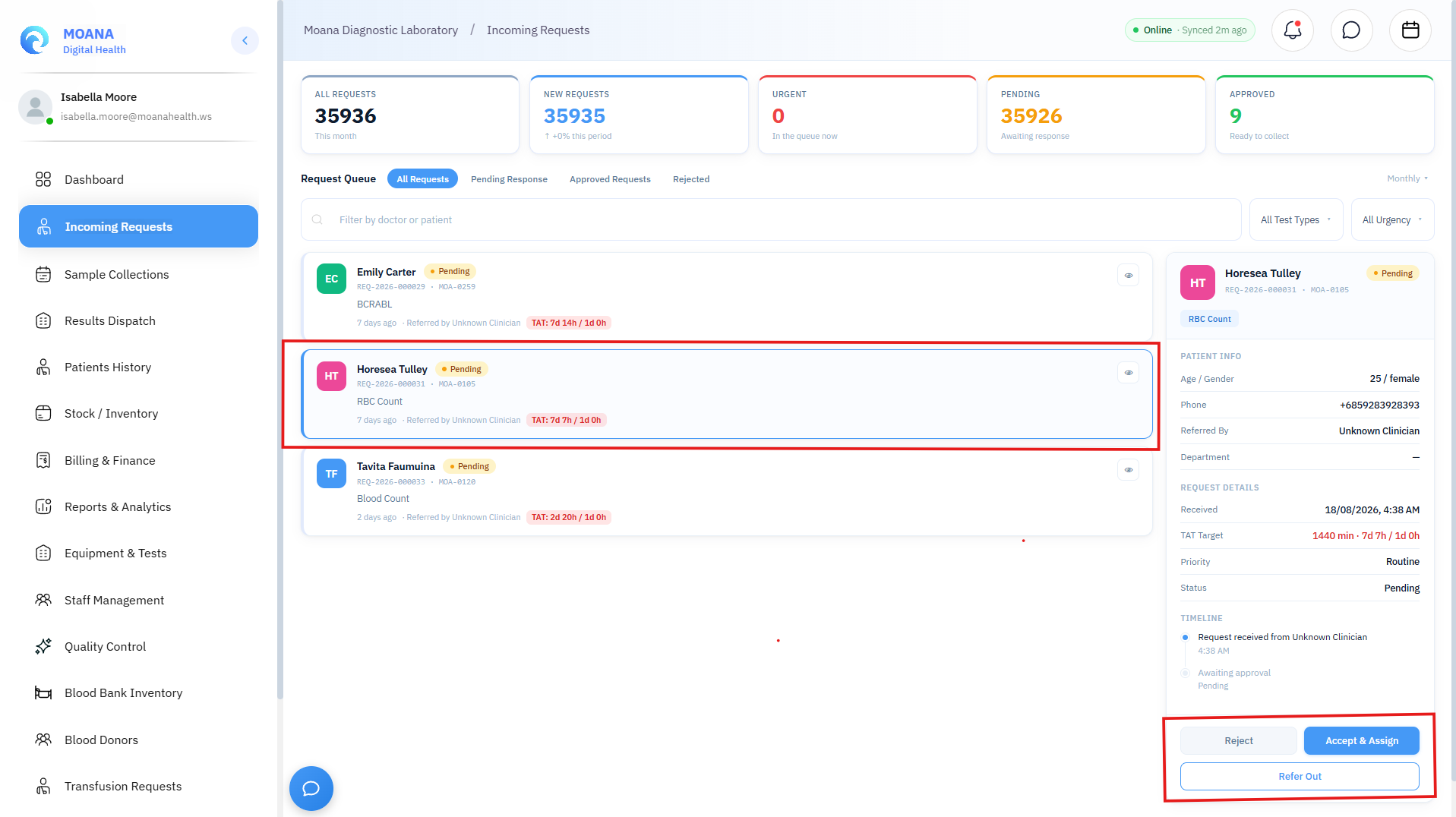
- Open the Sample Collections module.
- Select the patient and order to view the required collection tubes and specimen types:
- 🟣 EDTA (Lavender Top): Full Blood Count (FBC), HbA1c, Blood grouping.
- 🟡 SST / Gel Separator (Gold Top): Clinical biochemistry, liver/renal panels, electrolytes, serology.
- 🔵 Sodium Citrate (Light Blue Top): Coagulation profiles (PT/INR, APTT, D-Dimer).
- 🔴 Plain Clot Activator (Red Top): Therapeutic drug levels, crossmatch screening.
- 🟢 Sodium Heparin (Green Top): Blood gases, ammonia.
- 🔘 Sterile Container: Urine, sputum, CSF, wound swabs, tissue biopsies.
- Scan & Affix Barcode: The thermal printer generates tamper-proof barcode labels containing the Accession ID, Patient Name, Health ID, and collection timestamp.
- Specimen Acceptance & Rejection Criteria:
- Inspect specimen for pre-analytical rejection triggers: Hemolysis, Lipemia, Clotted EDTA, Insufficient Sample Volume (QNS), or Mislabeled Tube.
- If rejected, the system logs the rejection reason and automatically notifies the ordering clinician to request a fresh specimen redraw.
Step 3: Bench Analysis & Quality Control (QC)
- Automated Analyzer Interfacing: Supported biochemistry and hematology analyzers transmit raw analytical observations directly to Moana-LIS via bi-directional ASTM / HL7 protocols.
- Statistical Quality Control (QC):
- Run daily Low, Normal, and High control materials before testing patient specimens.
- Moana-LIS automatically evaluates QC data against Westgard Multi-Rules (1-2s, 1-3s, 2-2s, R-4s, 4-1s, 10x).
- Any Westgard rule violation flags the analyzer as out-of-control, locking patient result entry until recalibration and control runs pass.
- Manual Result Entry & Delta Checks:
- For manual bench assays (e.g., microscopy, manual differential, Gram stain), enter values into the structured result form.
- Automated Delta Checks: The system compares current observations against the patient's previous historical results. Rapid, clinically implausible shifts (e.g., Hemoglobin dropping from 14 g/dL to 5 g/dL in 2 hours without trauma) trigger a Delta Warning requiring repeat verification.
Step 4: Pathologist Supervisor Verification & Critical Panic Results
graph TD
    A[Lab Tech Submits Results] --> B[Supervisor Verification Queue]
    B --> C{Within Normal / Alert Limits?}
    C -->|Normal / Expected| D[Supervisor Approves Result]
    C -->|Critical Panic Value!| E[🔴 Trigger Panic Value Protocol]

    E --> F[Direct Phone Call to Attending Doctor]
    F --> G[Document Verbal Read-Back in LIS]
    G --> D

    D --> H[Separate Dispatch Release Step]
    H --> I[Electronic Report Published to EHR]
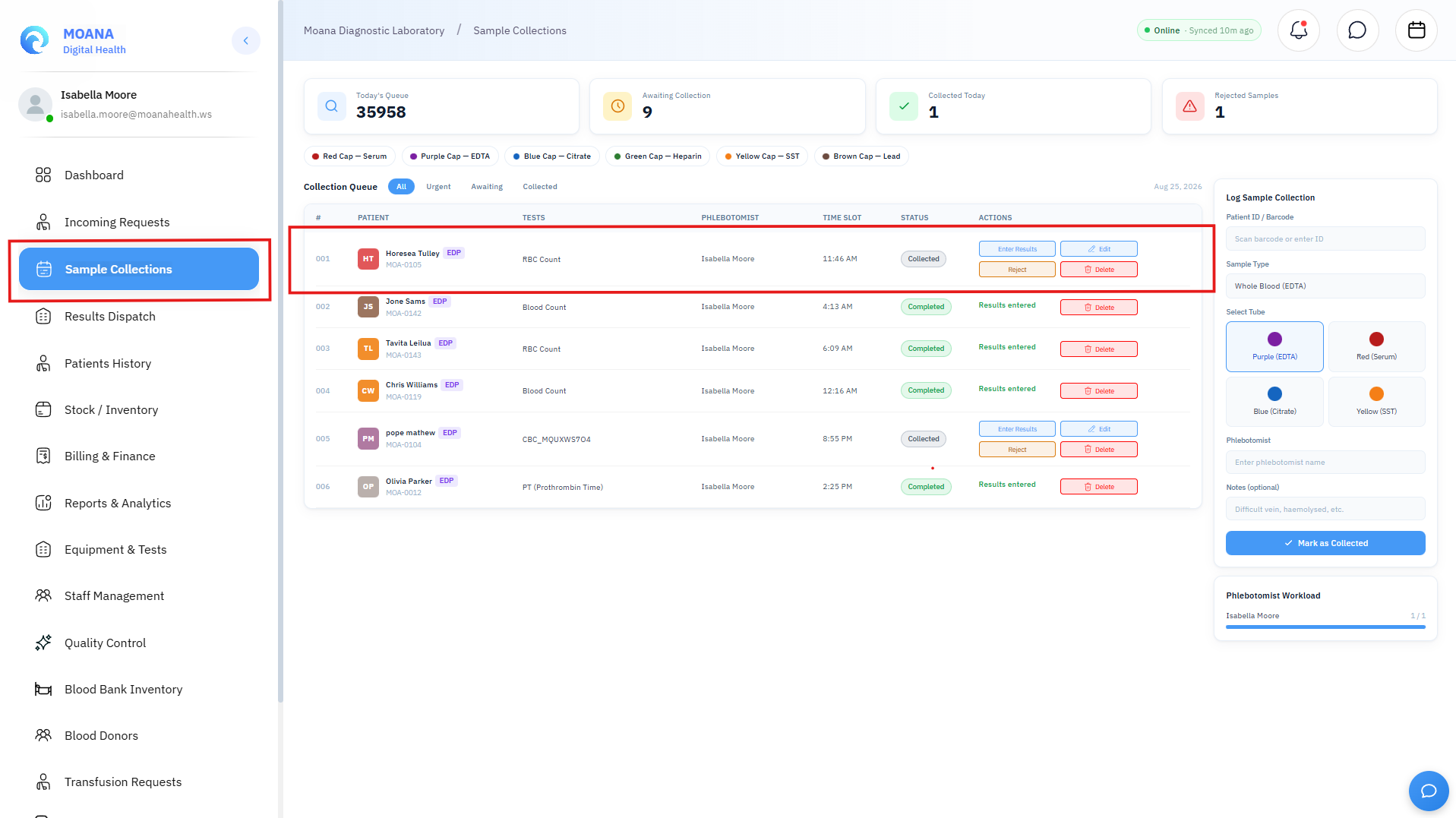
:::important Crucial Distinction: Approval vs. Dispatch In Moana-LIS, Approving a result validates its analytical accuracy within the laboratory database. However, the result is NOT visible in the doctor's EHR chart until a separate Dispatch action is performed. Dispatch is the official legal release step to the hospital clinical team. :::
Critical Panic Result Notification Protocol:
- When a panic threshold is breached (e.g., Serum Potassium > 6.5 mEq/L, Platelets < 20,000/μL, Positive Blood Culture):
- The system highlights the result in bold red and locks direct unattended dispatch.
- Mandatory Verbal Communication:
- The laboratory supervisor contacts the attending physician or on-duty ward medical officer via telephone.
- Document Verbal Read-Back:
- In the Notify Clinician Modal, record the clinician's full name, contact telephone, exact time of verbal communication, and confirmation of verbal read-back.
- 30-Minute Auto-Escalation:
- If a critical result remains unacknowledged by the clinical team within 30 minutes of dispatch, Moana-LIS automatically escalates an urgent SMS/app alert to the Clinical Head of Department.
3. Blood Bank & Transfusion Medicine
The integrated Blood Bank console manages donor recruitment, blood collection, component processing, serological testing, perpetual cold storage, and patient crossmatching:
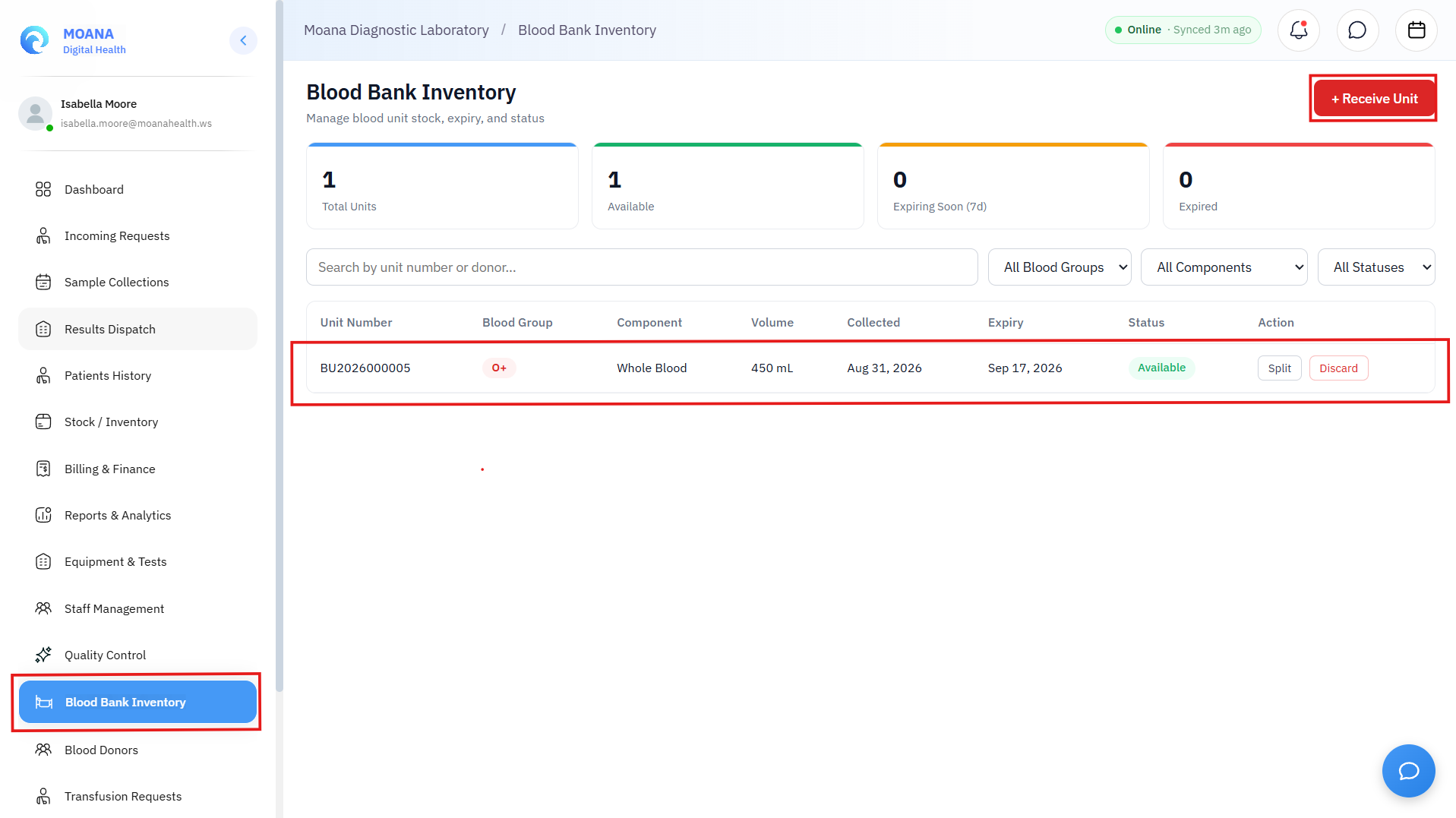
1. Donor Management & Collection
- Register voluntary and replacement donors with comprehensive medical questionnaires and hemoglobin copper-sulfate / HemoCue screening.
- Record whole blood collection units with unique donor identification numbers (DIN).
2. Blood Component Processing & Inventory
- Whole blood is separated into specialized components:
- Packed Red Blood Cells (PRBC): Stored at 2°C to 6°C (Shelf life: 35–42 days).
- Fresh Frozen Plasma (FFP): Stored at ≤ -18°C (Shelf life: 1 year).
- Platelet Concentrates (PC): Maintained on continuous agitating shakers at 20°C to 24°C (Shelf life: 5 days).
- Cryoprecipitate: Stored frozen for fibrinogen and Factor VIII replacement.
- Perpetual inventory tracks units by ABO/Rh group (
O+,O-,A+,A-,B+,B-,AB+,AB-) with real-time expiry alerts.
3. Transfusion Requests & Crossmatching
- Inpatient transfusion requests arrive electronically from clinical wards.
- Laboratory performs mandatory ABO/Rh Blood Typing and Antibody Screening on the patient's pre-transfusion sample.
- Perform Major and Minor Crossmatch compatibility testing.
- Compatible units are reserved, tagged with tamper-evident patient compatibility slips, and issued to the clinical ward using barcode custody verification.
4. Laboratory Role-Based Access Control (RBAC)
| Operational Capability | Phlebotomist / Lab Tech | Medical Laboratory Scientist | Laboratory Supervisor / Pathologist | Laboratory Director |
|---|---|---|---|---|
| Specimen Intake & Barcoding | ✅ | ✅ | ✅ | ✅ |
| Bench Result Entry | ✅ | ✅ | ✅ | ✅ |
| Statistical QC Validation | ❌ | ✅ | ✅ | ✅ |
| Approve Analytical Results | ❌ | ❌ | ✅ | ✅ |
| Dispatch Reports to EHR | ❌ | ❌ | ✅ | ✅ |
| Issue Blood Bank Units | ❌ | ✅ | ✅ | ✅ |
| Modify Reference Ranges & LOINC | ❌ | ❌ | ❌ | ✅ |