Outpatient (OPD) & Emergency Triage Intake
This section describes the workflows for managing scheduled outpatient clinic arrivals, walk-in consultations, emergency department intake, and clinical triage acuity stratification.
1. Before You Begin
- Authorized Roles: Hospital Receptionist, Triage Nurse, Emergency Medical Officer, Doctor.
- Clinical Principle: Outpatient cases follow scheduled appointments or queue check-in sequence; Emergency cases are prioritized strictly by clinical acuity (triage category), bypassing standard queues.
2. Step-by-Step Intake & Triage Workflows
graph TD
    Arrival[Patient Arrival at Hospital] --> Routine[Routine / Scheduled Clinic]
    Arrival --> Emergency[Acute / Emergency Intake]
    Routine --> ClinicQueue[Assign to Doctor Consultation Queue]
    Emergency --> Triage[Triage Vitals & 5-Tier Acuity Scoring]
    Triage --> STAT[Level 1 & 2 Red/Orange: Immediate Resuscitation]
    Triage --> Urgent[Level 3 to 5 Yellow/Green: Priority Urgent Care]
Workflow A: Scheduled OPD & Clinic Queue Check-In
- Open Appointments or Patients.
- Locate the patient's scheduled consultation booking.
- Click Check-In Patient:
- Status updates from
Scheduled→Checked-In. - The system calculates the estimated wait time based on active physician queue length.
- The patient's name appears on the assigned Doctor's active worklist.
- Status updates from
Workflow B: Emergency Department Intake
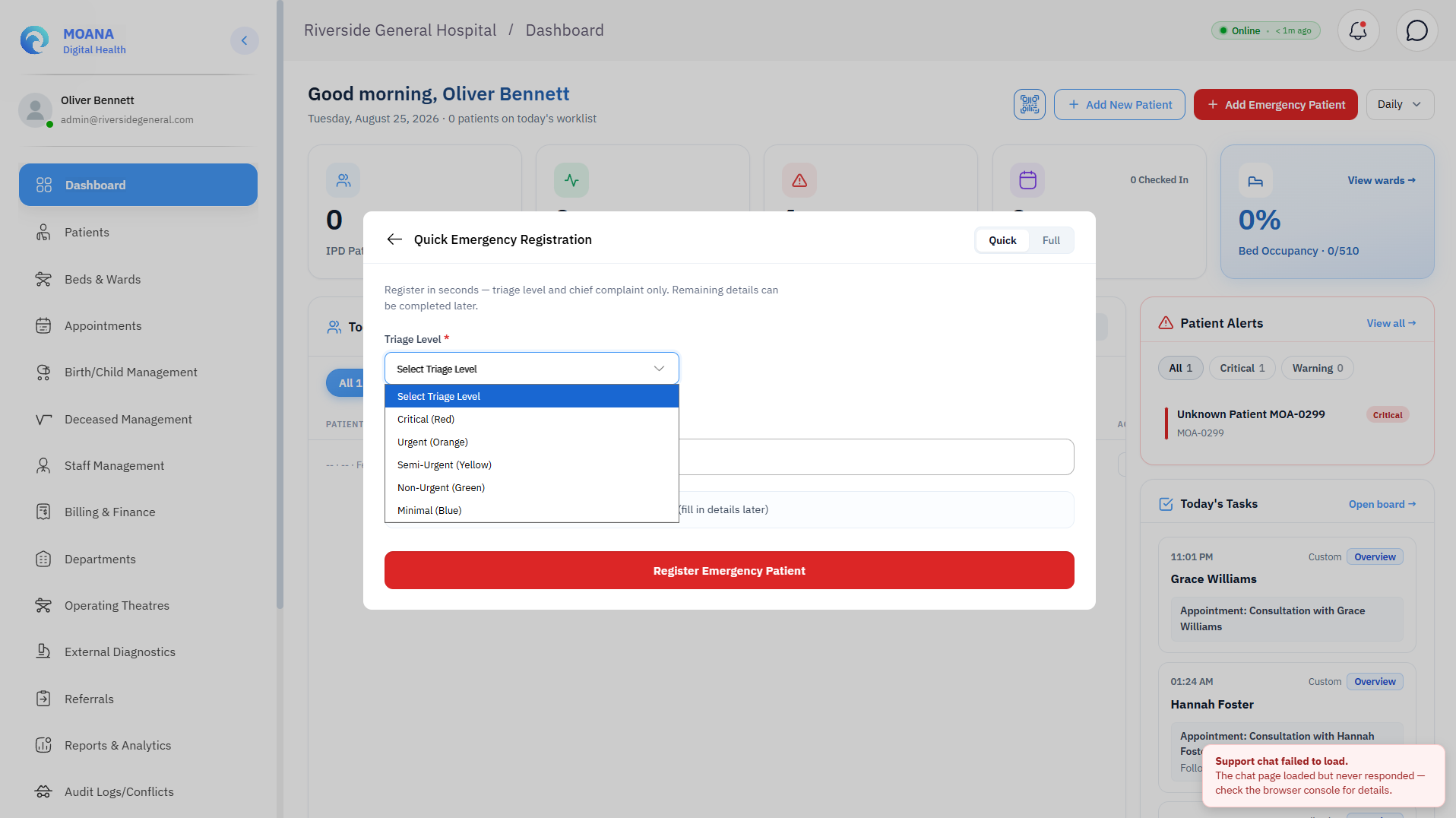
- On the top navigation bar or Dashboard, click + Emergency Case.
- Select whether the patient is an Existing Patient (search MPI) or Unidentified Trauma Patient.
- Record Arrival Specifics:
- Arrival Mode:
Ambulance,Walk-In,Police Escort,Inter-Facility Transfer. - Accompanying Person / Paramedic Details.
- Arrival Mode:
- Record Presenting Complaints & Initial Observations:
- Primary symptom (e.g., Severe chest pain radiating to left arm, Major motor vehicle trauma, Acute shortness of breath).
- Symptom onset time.
- Capture Immediate Triage Vital Signs:
- Blood Pressure (Systolic/Diastolic mmHg), Pulse / Heart Rate (bpm), Respiratory Rate, Oxygen Saturation (SpO2 %), Temperature (°C), Glasgow Coma Scale (GCS / 15), Blood Glucose (mmol/L).
3. MEWS Deterioration Score & Safety Alert
The system calculates a Modified Early Warning Score (MEWS) from the 5 baseline triage vital signs: Heart Rate, Blood Pressure, SpO2, Temperature, and Respiratory Rate.
Patient Safety Checkpoint: MEWS ≥ 5 — Automatic High-Priority Alert When triage vital signs produce an aggregate MEWS score of 5 or more:
- A HIGH-priority deterioration alert fires immediately across the clinical team's dashboard.
- An active Clinical Decision Support (CDS) entry is generated.
- Clinical staff must acknowledge the alert in the system, attend the patient immediately, and escalate to the emergency physician. Note: MEWS alerts fire on the COMBINED aggregate score — a single abnormal vital does not trigger the high-priority alert.
4. Five-Tier Clinical Triage Acuity System
Moana validates the 5-tier triage classification for clinical prioritization:
| Triage Category | Visual Badge | Target Doctor Response | Mandatory Clinical Scenarios |
|---|---|---|---|
| Resuscitation (STAT / Level 1) | 🔴 Red | Immediate (0 Minutes) | Cardiac / respiratory arrest, major exsanguinating trauma, status epilepticus, severe anaphylaxis. |
| Emergency (Level 2) | 🟠 Orange | Within 10 Minutes | Acute myocardial infarction, severe respiratory distress (SpO2 < 90%), stroke symptoms within window. |
| Urgent (Level 3) | 🟡 Yellow | Within 30 Minutes | Open fractures, moderate asthma, severe localized pain (Score 7-10), acute abdominal peritonitis. |
| Semi-Urgent (Level 4) | 🟢 Green | Within 60 Minutes | Simple closed fractures, minor lacerations requiring suture, mild fever in stable adult. |
| Non-Urgent (Level 5) | 🔵 Blue | Within 120 Minutes | Medication refills, chronic joint pain, minor rash, medical fitness certificates. |
5. Common Issues & Troubleshooting at Intake
| Symptom | Probable Cause | Mandatory Corrective Action |
|---|---|---|
| OPD encounter cannot be opened | Patient has an active Emergency or Inpatient encounter | Resolve or close the existing open encounter first; verify you have selected the correct patient. |
| Same-day OPD visit refused | System strictly enforces one OPD encounter per patient per calendar day | If a second visit is clinically necessary, contact the Hospital Administrator for manual override. |
| Doctor assignment fails | Target user does not hold the Doctor role in the system | Verify the clinician's role assignment in Staff Management; contact IT Administrator. |
| MEWS score not calculating | Incomplete vital signs entry | All five triage vitals (Heart Rate, Systolic BP, SpO2, Temperature, Respiratory Rate) must be entered for the score to calculate. |
6. Workflow Result & Departmental Handoff
The emergency encounter is initialized. Red and Orange priority cases trigger real-time audio-visual alert chips on the Doctor Emergency Worklist and Bed Command Center, immediately locking holding bay allocations.