Patient Registration & Master Patient Index (MPI)
This section describes the complete workflow for searching the Master Patient Index (MPI), preventing duplicate records, capturing comprehensive patient demographics, and generating official Moana Health ID cards.
1. Purpose & Overview
The Registration module creates and manages each patient's identity record in Moana. It assigns a unique Moana Patient ID and links all encounters, results, diagnoses, and medications to a single, unduplicated identity. The Master Patient Index (MPI) is the identity foundation of the entire system — a correct registration at this stage protects every subsequent clinical process.
- Authorized Roles: Hospital Receptionist, Registration Clerk, Triage Nurse, Doctor, Hospital Administrator.
- Primary Objective: Prevent duplicate identity records by conducting a mandatory MPI duplicate search before initiating new registrations.
2. Two Registration Paths — Know the Difference
| Registration Path | How to Access | Duplicate Detection Mechanism | Admin Review Queue? | When to Use |
|---|---|---|---|---|
| Path A — Add Patient | Patients screen → + Add Patient | Exact match only (National Health ID or Phone Number) | No | Standard walk-in registration of clearly new patients |
| Path B — Patient Registry (MPI) | External Diagnostics → Patient Registry (MPI) tab | Weighted probabilistic match: Name, DOB, Phone, Gender, Village | Yes — Admin resolves | When a patient may already exist; near-duplicate validation scenarios |
Patient Safety Checkpoint: Search Before Create Always search for the patient before creating a new record. Duplicate patient records split the clinical history — a missed allergy or previous diagnosis in an unseen record is a severe patient safety risk. If in doubt, use Path B (MPI screen) to catch near-matches.
3. Step-by-Step — Path A: Standard Walk-In Registration
graph LR
    A[1. Search MPI by Name/ID] --> B{Matching Record Found?}
    B -->|Match Found| C[Open Existing Patient Record]
    B -->|No Match| D[2. Click '+ Add Patient']
    D --> E[3. Fill Required Demographics]
    E --> F[4. Save & Assign Moana ID]
- Search First: Open the Patients screen from the sidebar. Type the patient's name and date of birth in the search bar. Review ALL results before proceeding.
- Verify Existing Record: If a matching record is found, verify identity with a second identifier (National ID, phone, or address). Use the existing record — do not create a new one.
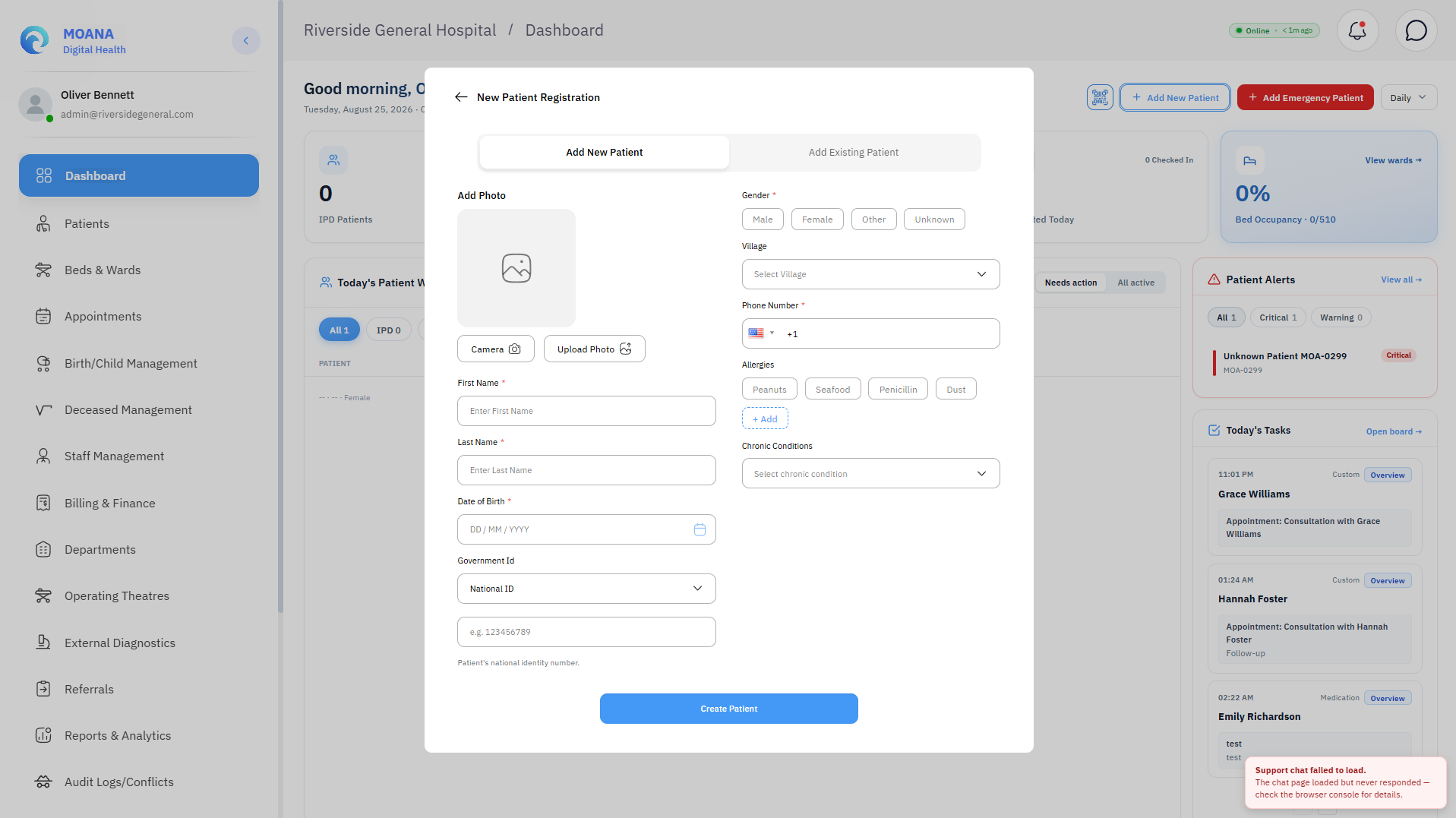
- Open Registration Form: If no match is found, click + Add Patient.
- Complete Demographics: Fill all mandatory fields:
- First Name & Last Name (Required for identity verification at every clinical step).
- Date of Birth (DOB) (Required — drives age-based dosing, pediatric pathways, and deduplication weighting).
- Gender / Biological Sex (
Male,Female,Other— drives sex-specific biological reference ranges in laboratory). - Phone Number (Minimum 7 digits — exact-match deduplication and patient contact).
- National Health ID & Village (Strongly recommended for national system integration).
- Emergency Contact (Mandatory for unconscious or incapacitated patients).
- Unconscious or Unidentified Patient: Tick the "Unknown Patient" checkbox. This allows minimum emergency registration immediately. Return to add full demographics once the patient is stabilized.
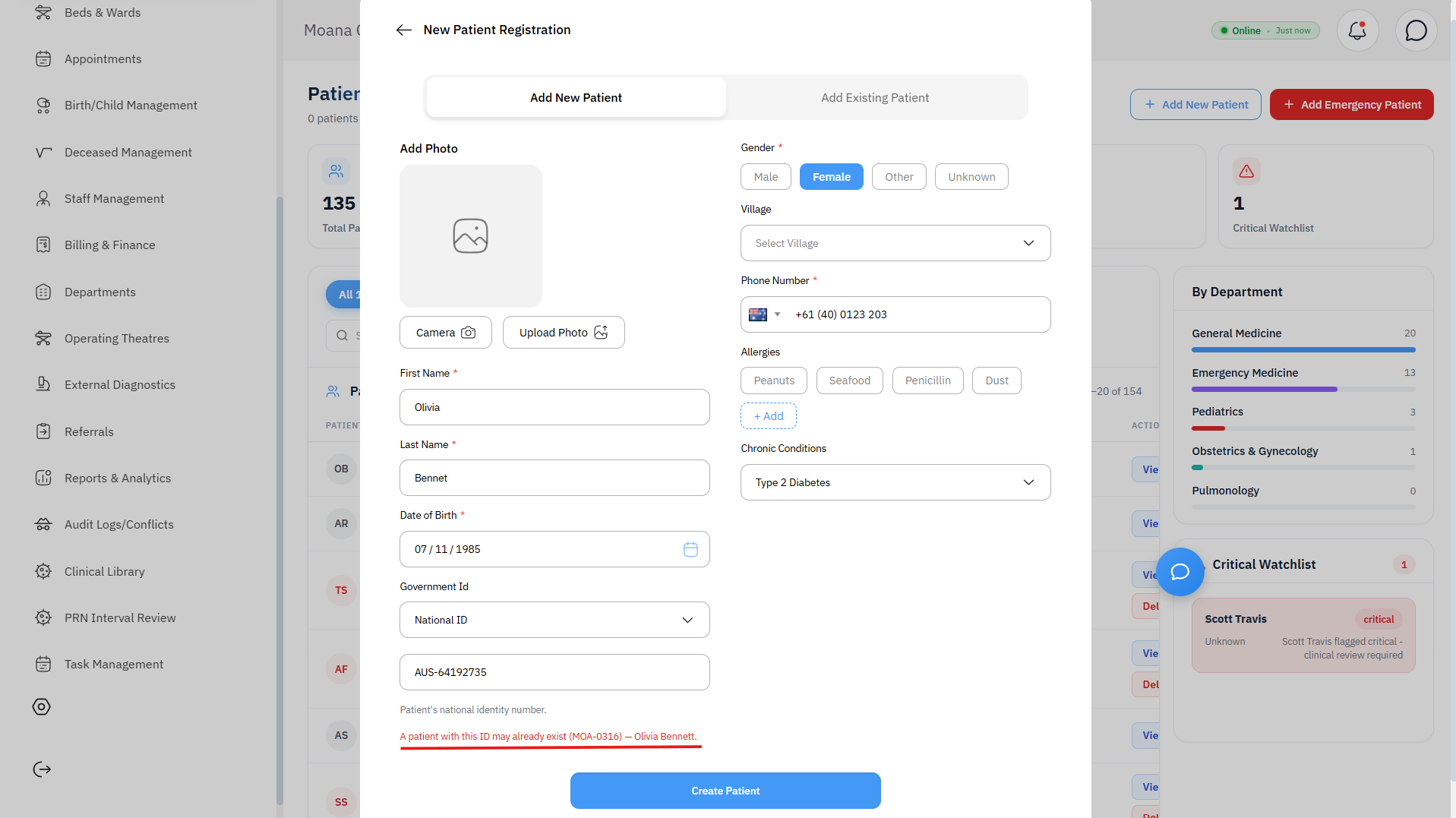
- Submit & Conflict Check: Click Submit. The system checks for exact matches. If a conflict appears, a record for this person already exists — open that existing record.
- Moana ID Assigned: The new Moana Patient ID is generated. The patient appears in the patient list and is immediately ready for encounter creation and clinic routing.
4. MPI Duplicate Identification & Record Merging Workflow
The Master Patient Index (MPI) console provides real-time probabilistic duplicate detection to prevent patient record fragmentation and safeguard longitudinal clinical histories.
Probabilistic Matching Algorithm & Weights
When searching or registering, the MPI engine computes a weighted match score across 5 key demographic parameters:
| Demographic Factor | Relative Weight | Calculation & Matching Rule |
|---|---|---|
| Name Similarity (Jaro-Winkler) | 0.50 | Catches phonetic variations and typos (e.g., "Johan" vs "John", "Kila" vs "Kilah") |
| Date of Birth (DOB) | 0.25 | High-precision exact birth date matching; flags potential twin or sibling matches |
| Phone Number | 0.15 | Exact-match on registered mobile or family contact number |
| Biological Sex / Gender | 0.05 | Exact classification match (Male, Female, Other) |
| Village / Residential Address | 0.05 | Strengthens near-matches within identical provincial/local LLG boundaries |
Match Scoring Actions & Resolution Tiers
graph TD
    A[Patient Search / Registration Input] --> B[MPI Weighted Match Scoring Engine]
    B -->|Score ≥ 90%| C[High Confidence: Auto-Flag Duplicate & Prompt Merge]
    B -->|Score 55% - 89%| D[Potential Duplicate: Route to Admin Review Queue]
    B -->|Score < 55%| E[Distinct Identity: Create New Record]
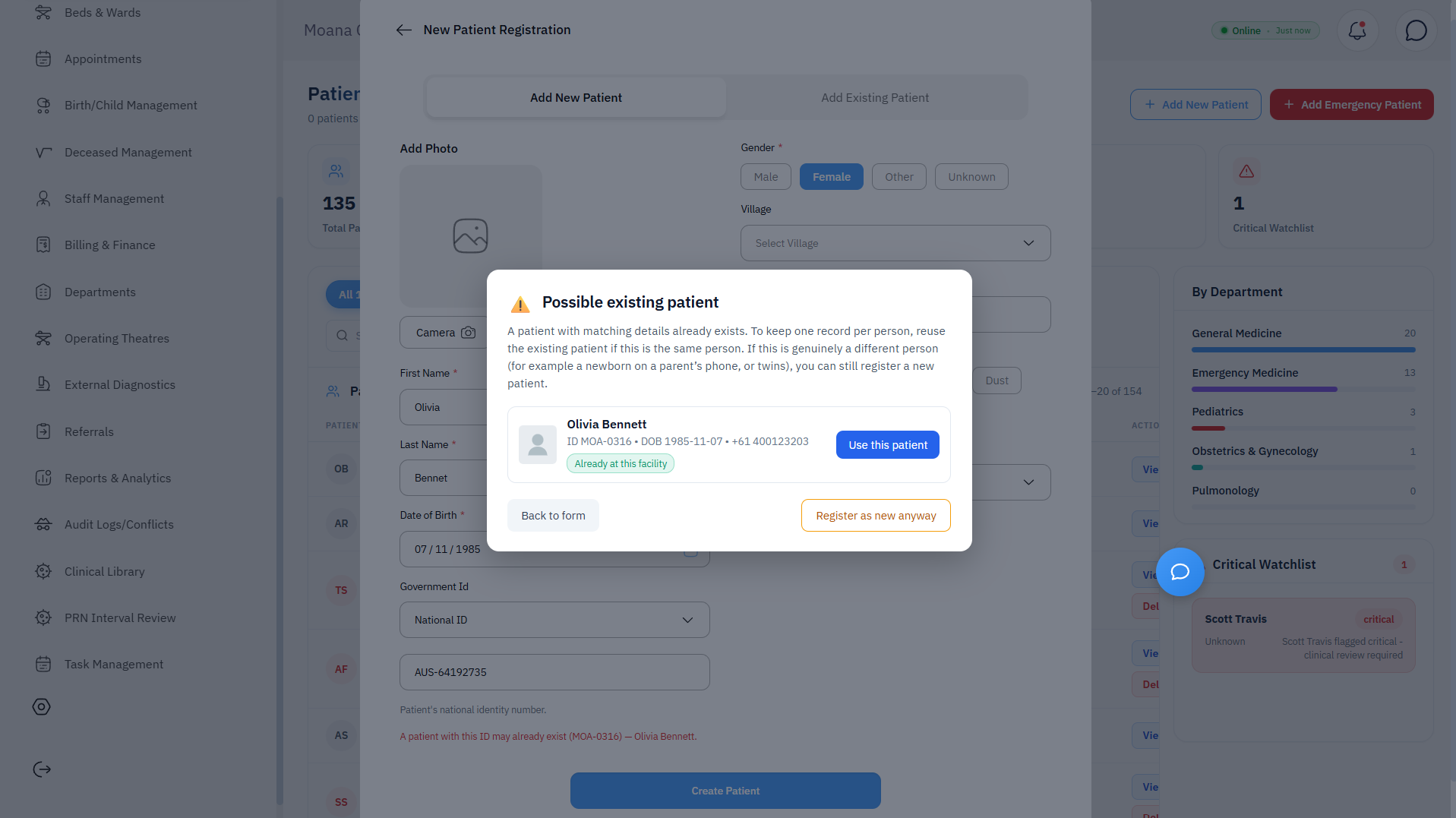
- Tier 1 — High Confidence Match (Score ≥ 90%): The system immediately flags a Duplicate Detected alert in the interface. The registration clerk is prompted to open the existing record or initiate an immediate consolidation.
- Tier 2 — Potential Duplicate / Review Queue (Score 55% – 89%):
Demographics share significant overlap (e.g., same DOB and village, but slightly different names). The record is marked as
Pending Reviewand routed to the MPI Dedup Queue for supervisor evaluation. - Tier 3 — Distinct Record (Score < 55%): The candidate record is treated as a distinct individual and proceeds with standard registration.
Step-by-Step Duplicate Resolution & Patient Merge Process
Step 1Review Side-by-Side Comparison
Open the Potential Duplicate Matches panel. Click on the matched patient rows to view the side-by-side comparison table showing Patient A (Selected Record) and Patient B (Potential Duplicate) across all demographic fields.
Step 2Verify Secondary Identifiers
Cross-reference the National Health ID (NHID), registered contact phone number, emergency contacts, and past clinical encounters to confirm whether both profiles belong to the same physical person.
Step 3Execute Record Merge or Separation
- Merge Patient Records: Click
Merge Patient Records. Select which record retains primary ID status. All previous encounters, laboratory orders, radiology studies, prescriptions, and billing histories from both records are merged into a single consolidated patient chart. - Keep Distinct: If the records belong to different individuals (e.g., twins or relatives with identical phone numbers), click
Keep Distinct. The system records an override in the audit log and prevents future duplicate alerts between the two IDs.
A unified patient record is established with an immutable audit trail entry (ACTION: MPI_PATIENT_MERGE). Clinical staff across all hospital wards and clinics see a single complete longitudinal medical record.
5. Required Demographics & Clinical Impact
| Demographic Field | Requirement Level | Direct Clinical Impact & Safety Rule |
|---|---|---|
| First Name & Last Name | Mandatory | Positive patient identity verification at every clinical step. |
| Date of Birth | Mandatory | CRITICAL: Drives age-based pediatric dosing calculations and deduplication weighting. |
| Gender | Mandatory | Deduplication weighting; sex-stratified biological reference ranges in laboratory tests. |
| Phone Number | Mandatory (7+ digits) | Exact-match deduplication; emergency contact for critical lab/radiology results. |
| National Health ID | Strongly Recommended | Strongest unique deduplication identifier; aligns with national digital health registries. |
| Village / Residential Address | Recommended | MPI weighted scoring; geographical health surveillance and contact tracing. |
| Emergency Contact | Recommended | Mandatory for unconscious, pediatric, or incapacitated patients. |
6. Registration Training Scenarios (R1 – R4)
| Scenario Code | Scenario Title | Action Performed | Expected Clinical Outcome |
|---|---|---|---|
| R1 | New Walk-In Patient | Search MPI → no match found → Path A registration with all fields → Submit | Moana ID assigned; no duplicate; patient queued for encounter. |
| R2 | Returning Patient | Search MPI → match found → verify with second identifier → open existing record | No new record created; existing longitudinal record used. |
| R3 | Near-Duplicate Record | Similar patient loaded → Path B → near-match enters review queue → Admin resolves | Correctly queued; Admin links or creates; no silent duplicate creation. |
| R4 | Unknown Emergency Patient | Emergency trauma arrival; Unknown Patient flag ticked → minimum registration | Encounter opens immediately; full demographics completed retrospectively when stable. |